
GLM-4.7: The Advanced Coding Assistant Empowering Your Development Work
Summary
GLM-4.7 is a cutting-edge coding assistant that delivers significant upgrades over its predecessor GLM-4.6 in multilingual agentic coding, terminal tasks, UI design, tool integration, and complex reasoning. This article details its performance, real-world use cases, and step-by-step usage guides.
If you’re a developer or someone who frequently works with code and design, a high-efficiency, intelligent tool can truly streamline your workflow. Today, we’re diving into just such a tool: GLM-4.7. What makes it stand out? How can it transform your daily work? And how do you get started with it? Let’s unpack all these questions and more.
GLM-4.7: Your New Go-To Coding Companion
GLM-4.7 isn’t just a minor update—it’s a comprehensive enhancement across multiple critical areas. From core coding capabilities to UI design, tool utilization, and even complex reasoning tasks, it brings meaningful improvements that matter for real-world use.
Core Coding Capabilities: Notable Gains Across Scenarios
For developers, core coding performance is paramount—and GLM-4.7 delivers impressive results.
Compared to its predecessor GLM-4.6, GLM-4.7 shows clear advantages in multilingual agentic coding and terminal-based tasks. Specifically:
-
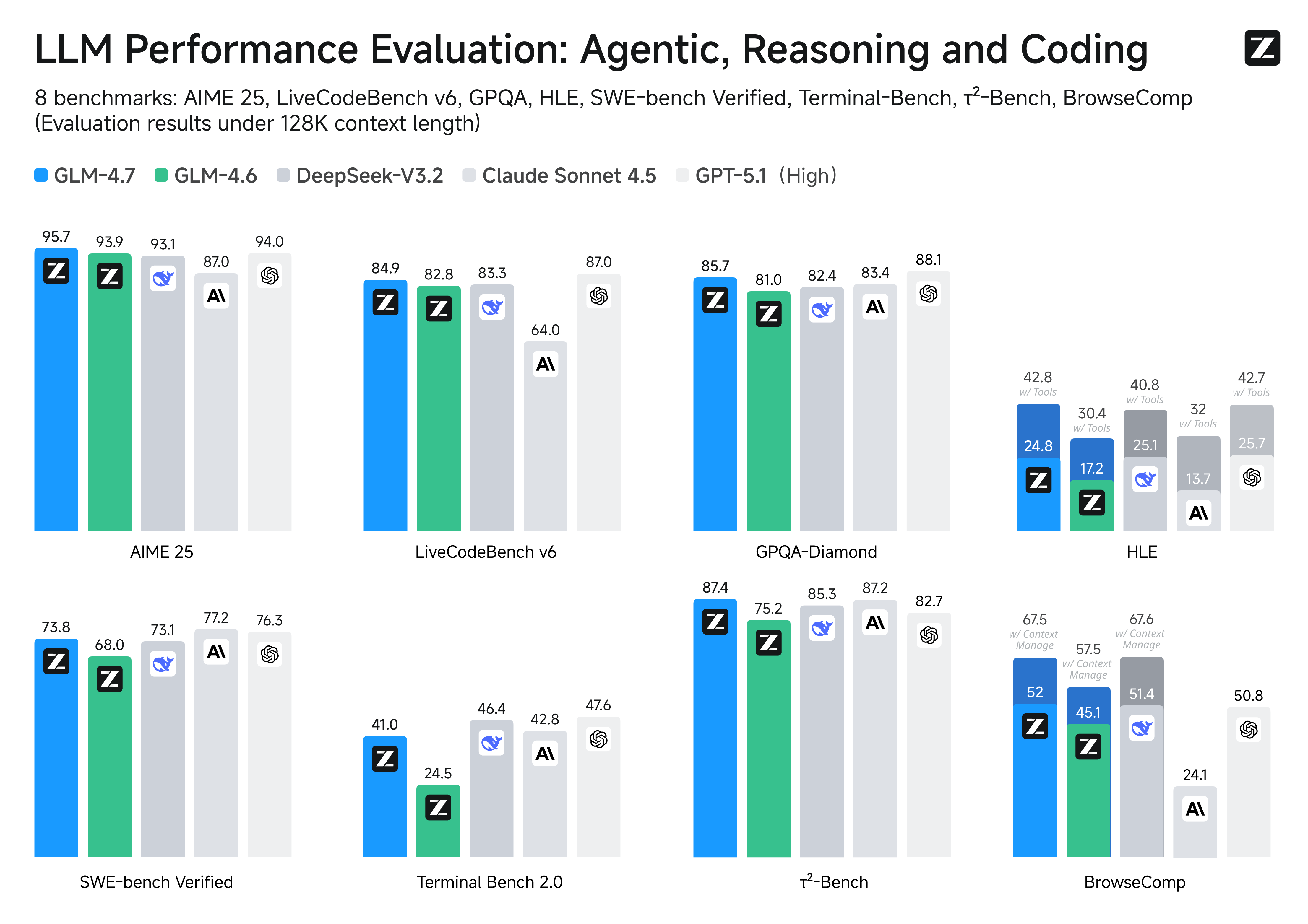
73.8% on SWE-bench (+5.8 percentage points vs. GLM-4.6) -
66.7% on SWE-bench Multilingual (+12.9 percentage points) -
41% on Terminal Bench 2.0 (+16.5 percentage points)
Beyond raw scores, GLM-4.7 introduces “think-before-act” functionality. This game-changer elevates performance on complex tasks within mainstream agent frameworks like Claude Code, Kilo Code, Cline, and Roo Code. Imagine tackling a intricate coding project where the tool maps out its approach first—minimizing errors and reducing rework.
Vibe Coding: Taking Design Quality to New Heights
GLM-4.7 also makes a giant leap in UI quality. We all know that clean, modern webpages and slides with precise layouts and proportional sizing create a far better user experience.
With its advancements in “vibe coding,” GLM-4.7 generates sleeker, more contemporary webpages and more visually appealing slides. Both layout accuracy and dimension consistency have seen marked improvements. For anyone juggling development and basic design tasks, this means less time tweaking details and more time focusing on creative vision.
Tool Integration: Your Secret Weapon for Productivity
In real-world workflows, we rarely rely solely on code—external tools are essential. GLM-4.7’s enhanced tool integration capabilities make it significantly more versatile.
It delivers standout performance on benchmarks like τ²-Bench and enables smoother web browsing via BrowseComp. This means when you need to fetch data, process information, or leverage external tools, GLM-4.7 operates seamlessly and accurately—saving you valuable time.
Complex Reasoning: A Leap Forward in Math and Logic
Complex reasoning, especially in math and logic, is a key measure of an intelligent tool’s capabilities. GLM-4.7 doesn’t disappoint here either.
On the HLE (Humanity’s Last Exam) benchmark, GLM-4.7 scores 42.8%—a 12.4 percentage point increase over GLM-4.6. This translates to sharper problem-solving for complex mathematical models in data analysis or logic puzzles in programming. It’s not just about writing code—it’s about solving problems smarter.
Of course, GLM-4.7 also shines in other scenarios like chatting, creative writing, and role-playing. It’s truly an all-around upgraded intelligent tool.
Benchmark Performance: GLM-4.7 vs. Leading Models
You might be wondering how GLM-4.7 stacks up against other mainstream models on the market. The table below provides a detailed comparison across 17 benchmarks—including 8 reasoning tests, 5 coding evaluations, and 3 agent assessments—pitting GLM-4.7 against GLM-4.6, Kimi K2 Thinking, DeepSeek-V3.2, Gemini 3.0 Pro, Claude Sonnet 4.5, GPT-5 High, and GPT-5.1 High.
As the table shows, GLM-4.7 holds its own across different test categories. It excels in tests like HMMT Feb. 2025 (97.1 score) and τ²-Bench (87.4 score), placing it among the top performers. While some models outperform it in specific areas, GLM-4.7’s overall performance—especially its significant improvements over GLM-4.6—speaks volumes about its capabilities.
It’s important to remember that AGI (Artificial General Intelligence) is a long journey, and benchmarks are just one way to measure performance. While these metrics provide valuable checkpoints, the true test lies in real-world usability. True intelligence isn’t just about acing tests or processing data faster—it’s about seamlessly integrating into our lives. And when it comes to “coding,” GLM-4.7 is making that integration smoother than ever.
Real-World Use Cases: What Can GLM-4.7 Actually Do?
All these performance metrics and data are helpful, but you might be wondering: What does GLM-4.7 deliver in practice? Let’s explore some real-world examples that showcase its capabilities.
Frontend Development Showcase
A user requested: “Build an HTML website with high-contrast dark mode + bold condensed headings + animated ticker + chunky category chips + magnetic CTA.”
GLM-4.7 delivered exactly what was needed. To view the full implementation process, visit the complete trajectory on Z.ai. Imagine getting a functional webpage prototype from a simple description—saving hours of development time.
Voxel Art Environment Design Showcase
Another request: “Design a richly crafted voxel-art environment featuring an ornate pagoda set within a vibrant garden. Include diverse vegetation—especially cherry blossom trees—and ensure the composition feels lively, colorful, and visually striking. Use any voxel or WebGL libraries you prefer, but deliver the entire project as a single, self-contained HTML file that I can paste and open directly in Chrome.”
GLM-4.7 rose to the challenge. Check out the full implementation here. For designers or developers needing quick visualization solutions, this kind of capability is a game-changer.
Poster Design Showcase
One user needed: “Design a poster introducing Paris, with a romantic and fashionable aesthetic. The overall style should feel elegant, visually refined, and design-driven.”
Again, GLM-4.7 delivered impressive results. View the complete trajectory on Z.ai. This example demonstrates that GLM-4.7 isn’t just for coding—it excels in design tasks too.
Beyond these examples, GLM-4.7 also shines in slide creation and other creative tasks, proving its versatility and practical value.
Getting Started with GLM-4.7: Everything You Need to Know
Now that you’ve seen GLM-4.7’s capabilities and real-world applications, you’re probably eager to try it yourself. Let’s walk through how to get started and explore its key features.
Interleaved Thinking & Preserved Thinking: Making Complex Tasks More Stable and Controllable
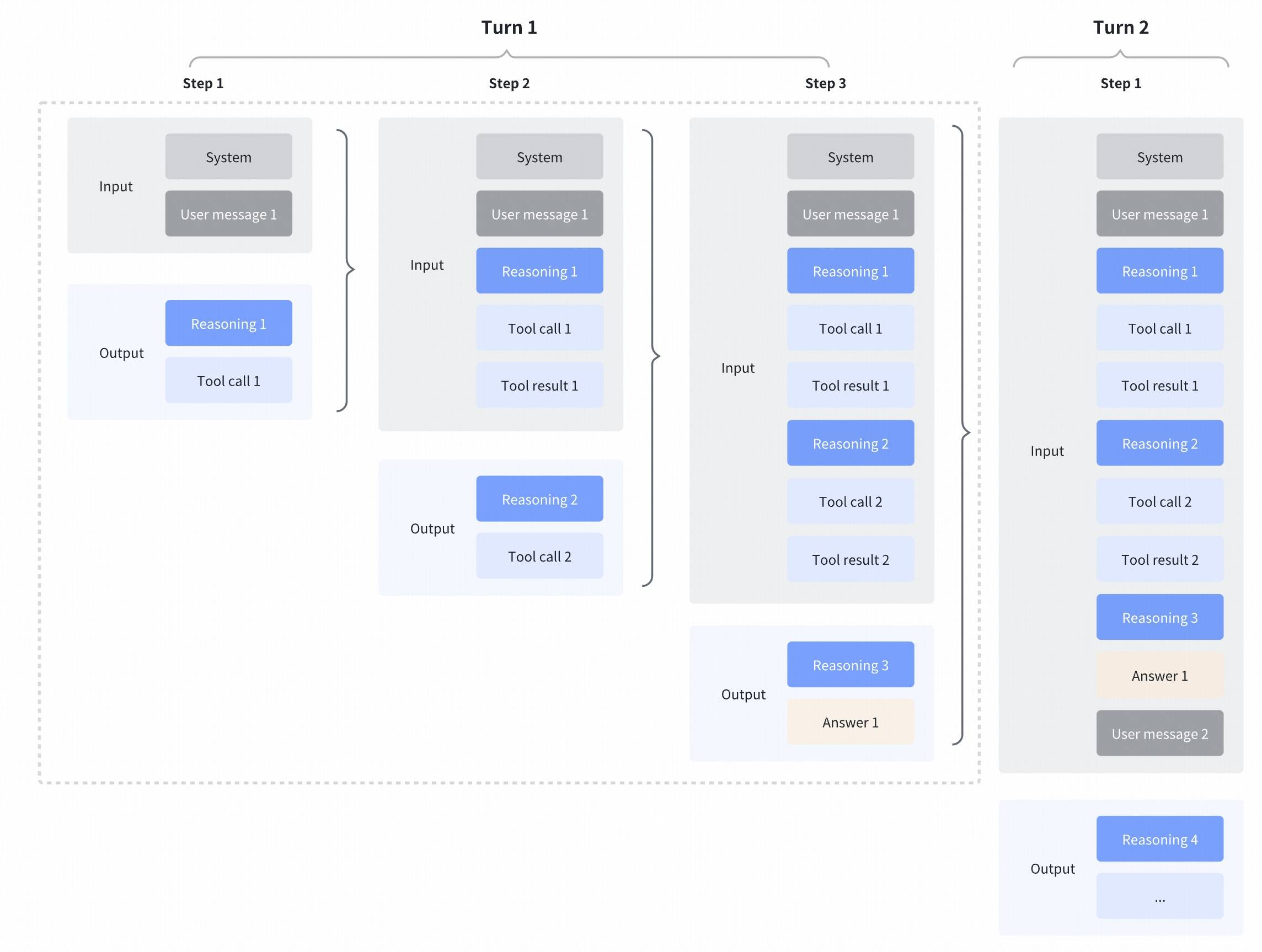
GLM-4.7 enhances the “Interleaved Thinking” feature introduced in GLM-4.5 and adds two new capabilities: “Preserved Thinking” and “Turn-level Thinking.” By thinking between actions and maintaining consistency across conversation turns, it makes complex tasks more stable and controllable.
-
Interleaved Thinking: GLM-4.7 thinks before every response and tool call, improving instruction adherence and output quality. Just like how we plan before acting, GLM-4.7 maps out its approach first. -
Preserved Thinking: In coding agent scenarios, GLM-4.7 automatically retains all thinking blocks across multi-turn conversations. It reuses existing reasoning instead of starting from scratch, reducing information loss and inconsistencies. This is perfect for long-horizon, complex tasks—like a multi-day coding project where maintaining continuity is crucial. -
Turn-level Thinking: GLM-4.7 lets you control reasoning on a per-turn basis within a session. Disable thinking for lightweight requests to reduce latency and costs, or enable it for complex tasks to boost accuracy and stability. This flexibility lets you balance efficiency and performance based on your needs.
For more details, visit the official guide.
Call GLM-4.7 API via the Z.ai API Platform
The Z.ai API platform offers access to the GLM-4.7 model. If you want to integrate GLM-4.7 into your applications or workflows via API, refer to the comprehensive API documentation and integration guidelines. Additionally, the model is available globally through OpenRouter—visit OpenRouter’s website for more information.
Use GLM-4.7 with Coding Agents
GLM-4.7 is now compatible with popular coding agents including Claude Code, Kilo Code, Roo Code, and Cline.
-
For GLM Coding Plan subscribers: You’ll be automatically upgraded to GLM-4.7. If you’ve customized app configurations (like ~/.claude/settings.jsonin Claude Code), simply update the model name to “glm-4.7” to complete the upgrade. -
For new users: Subscribing to the GLM Coding Plan gives you access to a Claude-level coding model at a fraction of the cost—just 1/7th the price with 3x the usage quota. To get started, visit the subscription page.
Chat with GLM-4.7 on Z.ai
GLM-4.7 is accessible directly through Z.ai. Simply change the model selection to “GLM-4.7” (the system may do this automatically—if not, a quick manual switch does the trick).
Serve GLM-4.7 Locally
If you prefer to run GLM-4.7 on your local machine, you’re in luck. Model weights for GLM-4.7 are publicly available on:
-
HuggingFace: https://huggingface.co/zai-org/GLM-4.7 -
ModelScope: https://modelscope.cn/models/ZhipuAI/GLM-4.7
For local deployment, GLM-4.7 supports inference frameworks including vLLM and SGLang. Comprehensive deployment instructions are available in the official GitHub repository—follow the step-by-step guide to run GLM-4.7 on your own hardware.
Important Technical Details
You might have questions about parameter settings or test conditions—here’s what you need to know:
-
Default settings (most tasks): Temperature 1.0, top-p 0.95, max new tokens 131072. For multi-turn agentic tasks (τ²-Bench and Terminal Bench 2), Preserved Thinking mode is enabled. -
Terminal Bench and SWE-bench Verified settings: Temperature 0.7, top-p 1.0, max new tokens 16384. -
τ²-Bench settings: Temperature 0, max new tokens 16384. For τ²-Bench, we added an extra prompt in Retail and Telecom interactions to prevent failures from incorrect user termination; for the Airline domain, we implemented domain fixes proposed in the Claude Opus 4.5 release report.
Frequently Asked Questions (FAQ)
What are the key improvements of GLM-4.7 over GLM-4.6?
GLM-4.7 delivers significant upgrades across multiple areas: Core coding (73.8% on SWE-bench +5.8%, 66.7% on SWE-bench Multilingual +12.9%, 41% on Terminal Bench 2.0 +16.5%), complex reasoning (42.8% on HLE w/ Tools +12.4%), UI design quality, and tool integration capabilities.
How do I upgrade to GLM-4.7 in coding agents?
GLM Coding Plan subscribers get automatic upgrades. If you’ve customized app configurations, simply update the model name to “glm-4.7”. New users can access GLM-4.7 immediately by subscribing to the GLM Coding Plan.
Does GLM-4.7 support local deployment?
Yes. Model weights are publicly available on HuggingFace and ModelScope. GLM-4.7 supports inference frameworks like vLLM and SGLang, with detailed deployment instructions in the official GitHub repository.
Which benchmarks does GLM-4.7 perform best on?
GLM-4.7 excels in tests like HMMT Feb. 2025 (97.1 score), τ²-Bench (87.4 score), and AIME 2025 (95.7 score), demonstrating strong performance in mathematical reasoning and agent tasks.
What is Preserved Thinking?
In coding agent scenarios, GLM-4.7 automatically retains all thinking blocks across multi-turn conversations. It reuses existing reasoning instead of re-deriving solutions, reducing information loss and inconsistencies—ideal for long-term, complex projects.
Can I call GLM-4.7 via API?
Yes. The Z.ai API platform provides access to GLM-4.7 with comprehensive documentation. The model is also available globally through OpenRouter for international users.
GLM-4.7 represents a significant step forward in intelligent coding assistance. Whether you’re a professional developer, designer, or anyone dealing with complex tasks, its combination of performance upgrades and practical features makes it a valuable addition to your workflow. Now that you have all the details, why not follow the guides above and experience GLM-4.7’s capabilities for yourself?
