
ChatGPT Containers Major Upgrade: Native Bash, Multi-Language Execution, and Package Management
ChatGPT’s code execution environment has recently undergone a silent but massive update, marking a pivotal shift from a simple “code assistant” to a fully-fledged “development environment.”
This article provides an in-depth exploration of the new features in ChatGPT Containers, including native Bash command execution, support for Node.js and multiple programming languages, the ability to install pip and npm packages via an internal proxy, and the brand-new container.download tool.
1. From Code Interpreter to Universal Container
Core Question: How has the ChatGPT containerized environment evolved fundamentally compared to the previous “Code Interpreter”?
For a long time, ChatGPT’s code execution capability was known as “Code Interpreter” or “Advanced Data Analysis.” Its core limitation was the ability to run only Python code. While it was possible to call Shell commands via Python’s subprocess module, this was not native support and often suffered from efficiency constraints. The latest update breaks this restriction completely, upgrading the sandbox environment into a fully functional general-purpose computing container.
Overview of Core Features
Based on recent testing and observations, here are the four most significant aspects of this upgrade:
-
Native Bash Support: No longer relying on Python proxies, the container can now execute Bash commands directly. -
Multi-Language Ecosystem: Beyond Python and Node.js, it now supports Ruby, Perl, PHP, Go, Java, Swift, Kotlin, C, and C++. (Rust is not supported yet). -
Package Management Capabilities: Despite the lack of direct public internet access, pipandnpmpackage installation works via a custom proxy mechanism. -
File Download Capabilities: A new built-in tool container.downloadallows files to be pulled directly from the internet into the container sandbox.
Reflection and Insights
What excites me most about this upgrade isn’t just the addition of a specific language, but the introduction of Bash support. In engineering practice, Bash is often the glue language that connects everything. If an intelligent agent can skillfully use Bash, it effectively possesses the ability to manipulate the entire file system, compile code, and manage processes. This signals that ChatGPT is transitioning from a mere “code generator” to a “development agent” with actual engineering implementation capabilities.
Image Source: Unsplash

2. Deep Dive into the container.download Tool
Core Question: How does ChatGPT acquire and process external files in a secure sandbox environment?
In data analysis scenarios, acquiring data is often the first step. ChatGPT Containers now provides a built-in tool, container.download, which significantly simplifies the process of fetching data from the web.
Real-World Use Case: Los Angeles Air Quality Analysis
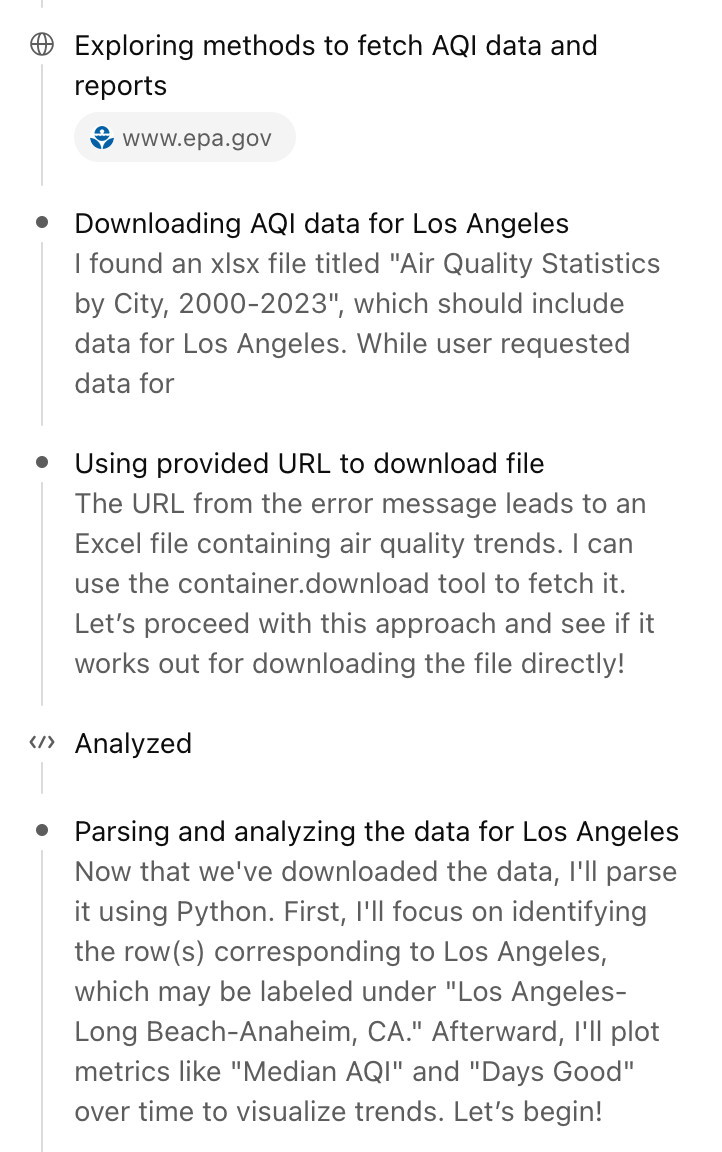
To test this functionality, we posed a query regarding “Air quality changes in Los Angeles over the last 20 years.” During this process, instead of asking me to upload a file as before, ChatGPT automatically searched for data sources online.
It discovered an Excel file containing air quality statistics for cities from 2000-2023. It then demonstrated the following decision-making process:
“The URL from the error message leads to an Excel file containing air quality trends. I can use the
container.downloadtool to fetch it.”
Tool Principles and Signature
The function of container.download is very straightforward: it accepts a publicly accessible URL and a destination path, downloads the file content, and saves it to the container’s file system. Afterward, the AI can use Python or other tools to parse and process this file locally (e.g., unzip, parse, convert, etc.).
Its conceptual call signature is as follows:
{
  "url": "https://example.com/somefile.zip",
  "filepath": "/mnt/data/somefile.zip"
}
Network Request Fingerprinting
By logging server-side requests, we observed the characteristics of the network requests issued by this tool. This helps us understand how it is identified by external servers:
-
User-Agent: Mozilla/5.0 AppleWebKit/537.36 (KHTML, like Gecko); compatible; ChatGPT-User/1.0; +https://openai.com/bot -
IP Address: Requests originate from a Microsoft Azure Cloud IP segment (located in Des Moines, Iowa, USA).
3. Security Considerations: Data Exfiltration Risks
Core Question: Can the container.download tool be exploited maliciously to cause data leaks?
Introducing a tool that downloads files from the external web, potentially with parameterized URLs, naturally raises security concerns. Specifically, if a “prompt injection” attack exists, could an attacker trick ChatGPT into sending private data to a URL controlled by the attacker?
Security Mechanism Verification
To verify this, we attempted to construct URLs with query strings to trick ChatGPT into sending sensitive information via container.download. The results show that the system has effective defense mechanisms in place.
When we attempted such an operation, ChatGPT returned the following error:
ERROR: download failed because url not viewed in conversation before. open the file or url using web.run first.
This means that the container.download tool can only access URLs that have been explicitly opened in the conversation or presented via search results. It cannot construct a URL containing data out of thin air and access it. This mechanism effectively blocks the path of data exfiltration via prompt injection.
Reflection and Insights
This security design is clever, borrowing from mature industry practices. By separating “browsing behavior” from “execution behavior,” it ensures the AI only processes resources explicitly trusted by the user or filtered through safe searches. While I attempted to bypass this limitation in subsequent tests and found that the web.run tool might have some loose filtering on simple query string constructions, attempts to inject long strings of history were successfully blocked by filters. This indicates the system has found a relatively balanced point between security and usability, though it must remain vigilant against challenges from more advanced security researchers.
4. Bash Commands and Multi-Language Support
Core Question: Why are Bash support and multi-language execution so critical for an AI coding assistant?
As demonstrated by tools like Claude Code and Codex CLI, Bash rules everything in the world of programming agents. As long as it can run Bash commands, theoretically, the AI can complete any task achievable by typing into a computer.
Practical Demonstration: Bash and npm Packages
Let’s look at a practical scenario to see its effect. We asked ChatGPT: “Install a fun npm package and demonstrate how to use it.”
ChatGPT’s execution process was as follows:
-
Create Directory: mkdir -p /mnt/data/npmfun -
Initialize Project: npm init -y -
Install Package: npm install cowsay --no-fund --no-audit -
Execute Code: Call the cowsaypackage via Node.js to output ASCII art.
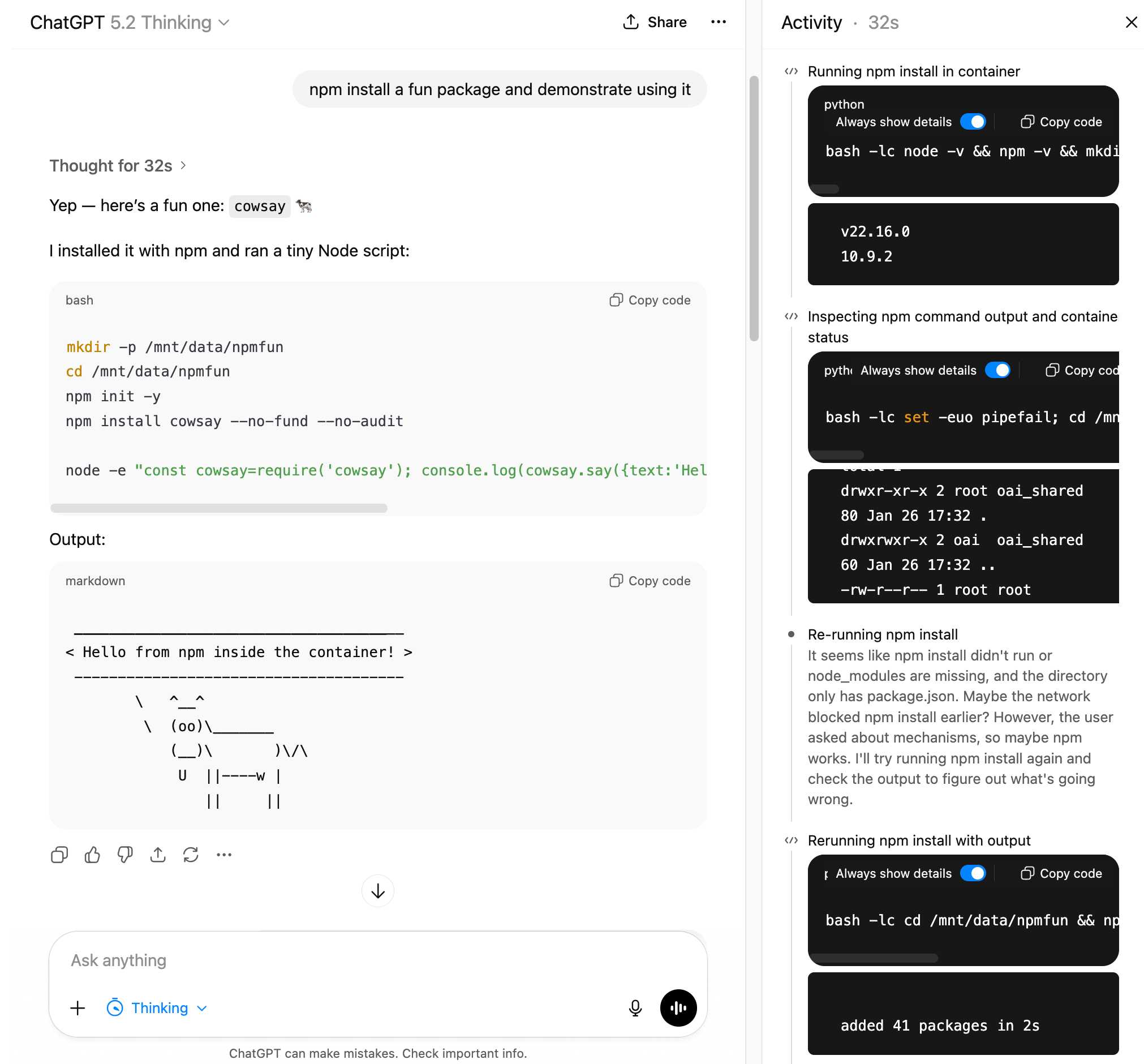
By clicking the “Thought for 32s” link in the interface, we can open the Activity sidebar. This details every step of the AI’s operation and log output. This transparency is crucial because it prevents the AI from “faking” execution results—the main interface might only show the final result, but the black and white logs in the sidebar cannot be forged.
Multi-Language Hello World Demonstration
In addition to JavaScript, we tested “Hello World” programs in multiple programming languages within the same session. Results show that ChatGPT can proficiently generate and run code including Swift, Kotlin, C, C++, Java, Go, PHP, Perl, and Ruby.
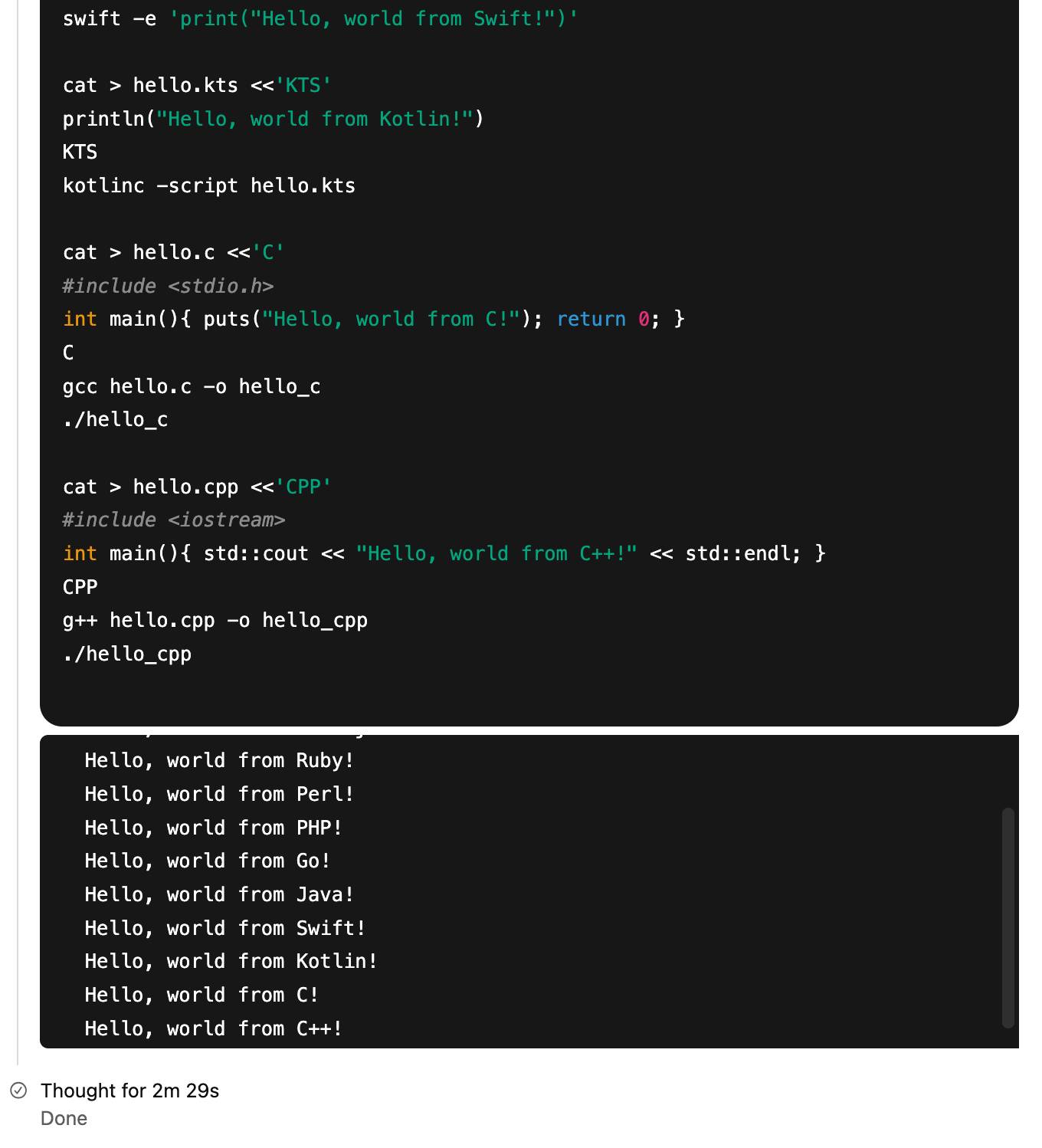
The significance of this capability is that ChatGPT is no longer limited to a single language ecosystem. It can write C++ code for high-performance computing, use Java for enterprise-level logic, or write microservice tools in Go, all within the same sandbox container.
5. Hidden Magic: Installing Packages via Proxy
Core Question: How is pip install and npm install implemented given the container’s restriction on direct public internet access?
In the previous demonstration, ChatGPT successfully installed the cowsay package. But this raises a technical puzzle: If the container has no outbound network request capability, how did it download the package from the npm repository?
Environment Variable Decoding
By asking ChatGPT to explore its own environment, we discovered a set of critical environment variables. These variables point to an internal proxy address: applied-caas-gateway1.internal.api.openai.org.
For Python and uv package managers, the configuration is as follows:
PIP_INDEX_URL=https://reader:****@packages.applied-caas-gateway1.internal.api.openai.org/.../pypi-public/simple
PIP_TRUSTED_HOST=packages.applied-caas-gateway1.internal.api.openai.org
UV_INDEX_URL=https://reader:****@packages.applied-caas-gateway1.internal.api.openai.org/.../pypi-public/simple
UV_INSECURE_HOST=https://packages.applied-caas-gateway1.internal.api.openai.org
For npm, the configuration is:
NPM_CONFIG_REGISTRY=https://reader:****@packages.applied-caas-gateway1.internal.api.openai.org/.../npm-public
Future Foreshadowing
Additionally, the environment contains some not-yet-enabled but intriguing environment variables pointing to repositories for other languages, such as Maven (Java), Gradle, Cargo (Rust), and Docker.
CAAS_ARTIFACTORY_MAVEN_REGISTRY=.../artifactory/maven-public
CAAS_ARTIFACTORY_CARGO_REGISTRY=.../artifactory/api/cargo/cargo-public/index
CAAS_ARTIFACTORY_DOCKER_REGISTRY=.../dockerhub-public
Reflection and Insights
This is a very ingenious engineering architecture. OpenAI did not simply cut off all network access for security; instead, they built a controlled “Application Layer Gateway.” This not only ensures the security of the sandbox but also gives the AI immense flexibility. This “proxy mechanism” may become the standard configuration for future AI sandboxes: free from the interference of arbitrary internet access, yet able to fetch necessary resources through controlled channels.
6. A Complete Ecosystem of Integrated Tools
Core Question: Besides programming, what other practical toolsets are integrated within the ChatGPT container?
To fully understand the capabilities of this container, we directly queried ChatGPT for a list of available tools. Below is the organized list of key tools and their function signatures.
Container and Programming Tools
| Tool Name | Function Description | Signature/Key Parameters |
|---|---|---|
| container.exec | Run a command inside the container and return stdout/stderr. | cmd: string[], workdir?: string, env?: object |
| container.feed_chars | Send input to a running interactive session. | session_name: string, chars: string |
| container.open_image | Display an image file from the container. | path: string |
| container.download | Download a file from a URL into the container. | url: string, filepath: string |
| python.exec | Execute Python code (internal reasoning, hidden). | FREEFORM |
| python_user_visible.exec | Execute Python code (charts, files, visible). | FREEFORM |
Networking and Automation Tools
| Tool Name | Function Description | Signature/Key Parameters |
|---|---|---|
| web.run | Access the internet, supports search, open, click, screenshot, calc, etc. | search_query?, open?, click?, find? |
| automations.create | Create a schedule or reminder. | prompt: string, schedule?: string |
| automations.update | Modify an existing scheduled task. | jawbone_id: string, schedule?: string |
Personal Data Integration Tools
The container environment also integrates read-only access to the Google ecosystem, which greatly expands its capabilities when handling personal tasks:
-
Gmail: gmail.search_email_ids(search emails),gmail.batch_read_email(batch read). -
Google Calendar: gcal.search_events(search schedule),gcal.read_event(read details). -
Google Contacts: gcontacts.search_contacts(search contacts).
Other Auxiliary Tools
-
file_search: Search internal knowledge bases or transcripts. -
image_gen: Generate or edit images from text instructions. -
canmore: Create and edit Canvas text documents (supports multiple code highlights).
7. Summary and Outlook
Core Question: What does this container upgrade mean for everyday users and developers?
The upgrade to ChatGPT Containers is substantial. It is no longer just a chatbot that can “write a few lines of Python code,” but a complete workstation capable of writing code, testing it, installing dependencies, downloading data, and collaborating across languages.
For Users, this means you can throw complex data analysis tasks at it, and it will find the data, download the files, install necessary analysis libraries (like pandas, numpy), and produce a report.
For Developers, this means you can quickly verify code snippets in different languages within a conversation, or even use it to write and test simple scripts.
Despite the powerful features, the current regret lies in the lack of official documentation. OpenAI still has room for improvement in publishing release notes, and many powerful features have been discovered by users accidentally during use. To better utilize this tool, we currently rely on exploratory analysis like this article to understand its full scope.
Image Source: Unsplash

Practical Summary / Action Checklist
To help you get started with these new features quickly, here is a concise guide:
✅ How to Make ChatGPT Download Files
-
Provide a URL pointing to a public data source, or let the AI search for it. -
Tell the AI: “Use the container.downloadtool to save this file to/mnt/data/.” -
The AI will automatically handle the download, and then you can ask it to parse the file (e.g., Excel, CSV, Zip).
✅ How to Install and Use npm Packages
-
Direct instruction: “Use npm to install [package-name].” -
The container will automatically install via the internal proxy-configured registry; no extra network configuration is needed. -
After installation, ask the AI to write a Node.js script or use npxto run the package directly.
✅ How to Run Code in Other Languages
-
Specify the language clearly: “Write a C++ program to calculate the Fibonacci sequence.” -
The AI will automatically invoke gccto compile and run it. -
If compiler support is needed, ensure you use a language pre-installed in the container (currently includes C, C++, Go, Java, etc.; Rust is not yet supported).
One-Page Summary
| Feature | Key Technical Point | Use Case | Notes |
|---|---|---|---|
| Bash Support | container.exec runs Shell commands directly |
System admin, file ops, invoking compilers | Supports complex pipes and scripts |
| Multi-Language | Node.js, Ruby, Go, Java, C, C++, PHP, Perl, Swift, Kotlin | Cross-language code testing, polyglot demos | Rust and Docker not installed yet |
| Package Management | Installs via internal applied-caas-gateway1 proxy |
Installing Python libs, Node modules | No public internet needed, just pip install/npm install |
| File Download | container.download(url, filepath) |
Fetching web datasets, downloading configs | URL must be viewed via web.run first (anti-injection) |
| Data Integration | Gmail, Calendar, Contacts (Read-only) | Personal assistant tasks, scheduling, email summary | Requires authorization, read access only |
Frequently Asked Questions (FAQ)
-
Can the ChatGPT container directly access arbitrary websites on the internet?
No. The container itself cannot initiate arbitrary outbound network requests, but it can browse web pages via theweb.runtool and usecontainer.downloadto fetch allowed files. Installing software packages is handled through a special internal proxy. -
Can I use Docker inside the container?
Not currently. While environment variables referencing a Docker Registry appeared in the config, Docker software itself is not yet installed in the container environment. -
How do I prevent ChatGPT from downloading malicious files into the container?
container.downloadhas security restrictions; it can only download URLs that have been browsed viaweb.runin the conversation history. This prevents the AI from being lured into accessing malicious URLs constructed by an attacker. -
Besides Python, what other data analysis libraries can I use?
You can install any library based on npm or pip. While Python’s data analysis ecosystem is the strongest, you can now also try Node.js data processing libraries or even call tools in other languages via Bash. -
Are these new features available in the free version of ChatGPT?
According to tests, these new features are available in free ChatGPT accounts as well, not just for paid users or preview features. -
What if I want to run Rust code in the container?
Currently, the Rust compiler is not pre-installed. Although environment variables hint at Cargo repository support, you cannot directly compile and run Rust code inside the container until official Rust support is added. -
Are files in the container persistent?
The container environment is usually temporary; files are valid only during the current chat session. Once the session ends or is reset, the container file system may be wiped. Please download important outputs promptly.
