
HiClaw: The Open-Source Multi-Agent OS That Lets AI Teams Actually Work Together
The core question this article answers: How do you run multiple AI agents in true collaboration — with enterprise-grade security, full human visibility, and zero credential exposure — without spending days on setup?
Most multi-agent frameworks sound compelling in theory. In practice, they tend to fall apart at the seams: leaked API keys, opaque agent-to-agent calls, no easy way to intervene when something goes sideways, and deployment pipelines that eat up engineering time before a single task is delegated.
HiClaw is an open-source collaborative multi-agent operating system that takes a different approach. Its core premise is straightforward: let multiple agents work together inside a shared IM network, with humans able to observe every conversation and step in at any moment. It does this through a Manager-Workers architecture, built on the Matrix real-time communication protocol, with an AI gateway handling all credential management at the center.
This article breaks down exactly how HiClaw works, why its design decisions matter, and how to get it running in under five minutes.
Why Multi-Agent Collaboration Is Still Broken
The ceiling for single-agent workflows isn’t a model problem — it’s an architecture problem.
Try to use one agent to handle an end-to-end software cycle: scope requirements, write frontend and backend code, open a pull request, and deploy. You’ll quickly run into the hard limits of what a single context window and a single execution thread can manage. Tasks get too long, context degrades, and there’s no practical way to course-correct mid-run.
The obvious answer is to distribute work across multiple agents. But existing multi-agent frameworks introduce a fresh set of problems:
-
Credential sprawl: Each agent holds its own real API key or GitHub PAT. If any one worker is compromised, the blast radius covers everything. -
Zero visibility: Agent-to-agent interactions happen inside code, not in a format humans can observe in real time. -
Brittle intervention: When an agent goes off-track, stopping and correcting it usually means restarting the whole system. -
Operational overhead: Configuring IM integrations, waiting for bot approvals, managing multiple processes — each step demands engineering time before you’ve delegated a single task.
HiClaw addresses each of these at the architecture level, not as an afterthought.
What HiClaw Is — and What It’s Built On
HiClaw is a distributed, containerized multi-agent OS that uses a two-layer Manager-Workers architecture and runs all agent communication over the Matrix protocol.
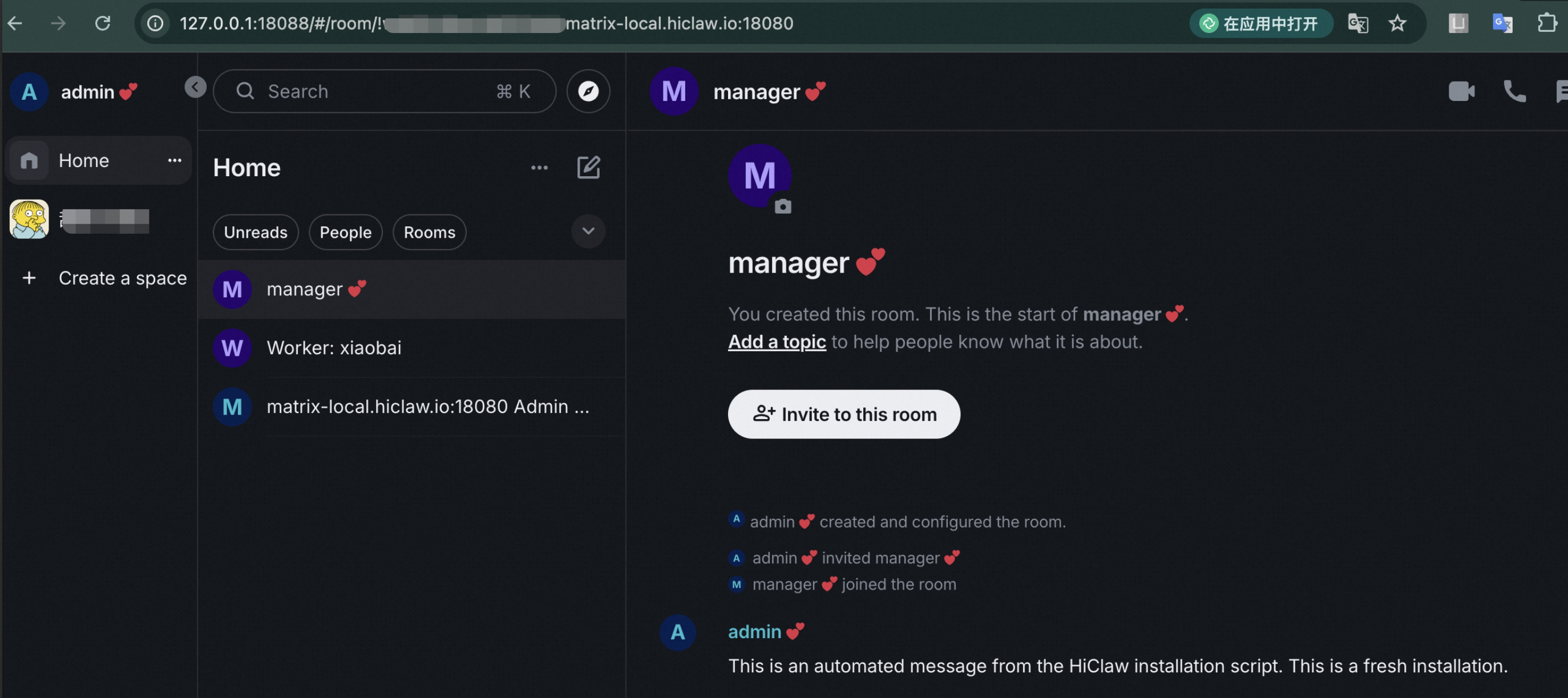
The simplest way to describe how it works: you tell the Manager Agent to create a frontend worker, and it does — automatically, without any manual configuration or restart. A Matrix room is created for that worker. You join the room, assign tasks by mentioning the worker, and watch the work happen. When the worker finishes, it submits a PR and reports back in the room.
At the infrastructure level, HiClaw is composed of five tightly integrated components:
| Component | Role |
|---|---|
| Higress AI Gateway | LLM proxy, MCP server hosting, centralized credential management |
| Tuwunel (Matrix server) | IM backbone for all agent and human communication |
| Element Web | Browser-based Matrix client, zero configuration required |
| MinIO | Centralized file storage; keeps workers stateless |
| OpenClaw / CoPaw | Agent runtimes with Matrix plugin and skills system |
These components are not loosely coupled. The install script orchestrates all of them together. One command brings the entire stack online.
The Security Model: Workers Never Touch Real Credentials
This is arguably the most important architectural decision HiClaw makes.
In conventional multi-agent setups, every agent gets a real API key. Every worker is a potential attack surface. If one worker is compromised — whether through a bug, a malicious skill package, or a prompt injection — the attacker has direct access to your LLM credentials, GitHub tokens, and anything else that worker was holding.
HiClaw separates access at the gateway level:
Worker (holds only a consumer token)
    → Higress AI Gateway (holds real API keys, GitHub PAT)
        → LLM API / GitHub API / MCP Server
Workers receive a consumer token — similar to a building access badge. It identifies them and grants them the ability to make requests through the gateway, but it doesn’t give them access to the underlying credentials. Real API keys and GitHub tokens never leave the gateway.
Even if a worker container is fully compromised, the attacker ends up with a rate-limited consumer token scoped to that worker. There’s no lateral movement to other workers, no access to the credential store.
This model extends to MCP Server integration, which landed in version 1.0.6. Any MCP tool can be securely exposed to workers through the Higress gateway. Workers call the tool using a Higress-issued token — the real credential behind the MCP server is never exposed. This means you can give workers access to a broad range of external tools without expanding the attack surface.
A note on why this matters at scale: Security hygiene is easy to maintain when you have three agents. When you’re managing thirty or three hundred, credential sprawl becomes structurally unmanageable if it’s designed wrong from the start. HiClaw builds the principle of least privilege into the default behavior of the system — workers can’t hold real keys even if they try to.
Why Matrix? The Protocol Behind Agent Communication
Matrix isn’t just a chat protocol here — it’s the audit trail, the intervention layer, and the client ecosystem all at once.
Most multi-agent coordination relies on message queues or HTTP callbacks for inter-agent communication. These work fine technically, but they have a practical problem: humans can’t casually observe or interrupt them. Inserting yourself into an async message queue mid-execution is not a natural interaction model.
Matrix is an open, federated real-time messaging protocol. All messages are persisted in rooms and are fully auditable. HiClaw maps each worker to a Matrix room. You, the Manager Agent, and the relevant Worker Agent are all present in that room.
The result is that human oversight is the default, not an add-on:
You: @bob hold on, change the password rule to minimum 8 characters
Bob: Got it, updated.
Alice: Frontend validation updated too.
No black boxes. No hidden agent calls. The entire chain of coordination happens in a room you can see and participate in.
The other benefit is the client ecosystem. Matrix already has mature clients across every platform: Element Web for the browser, Element Mobile and FluffyChat for iOS and Android. You don’t need to apply for a Slack bot, wait for a DingTalk approval, or configure webhooks. Install a Matrix client, point it at your server address, and you can manage your agent team from your phone.
How the Manager-Workers Architecture Works in Practice
The Manager is the control plane. It handles worker lifecycle management through natural language and monitors worker health automatically.
Here’s what a typical interaction looks like:
You: Create a frontend worker named alice

Manager: Done. Worker alice is ready.
         Room: Worker: Alice
         You can assign tasks directly in the room.

You: @alice build a login page in React

Alice: On it... [a few minutes later]
       Done! PR submitted: https://github.com/xxx/pull/1
The Manager doesn’t just create workers — it monitors them. It sends periodic heartbeat checks to all active workers. If a worker stalls or gets stuck, the Manager surfaces an alert in the room. This matters particularly for long-running tasks where you don’t want to babysit the process.
The Manager currently supports OpenClaw and CoPaw as worker runtimes, with NanoClaw and ZeroClaw on the roadmap. Workers can also pull skills on demand from skills.sh, a community registry with 80,000+ available skills. Because workers don’t hold real credentials, using public skill packages carries significantly lower security risk than it would in a conventional setup.
MinIO as a Shared File System: Solving the Token Cost Problem
When agents collaborate, passing large files through LLM context windows is expensive and slow. MinIO gives them a shared file system instead.
The token cost issue in multi-agent collaboration is easy to underestimate. If one worker produces a 500-line code file and needs to pass it to another worker, naively routing that through an LLM context window wastes tokens and adds latency. At scale, this gets expensive fast.
HiClaw integrates MinIO as a centralized object store that all workers can read from and write to. A worker that finishes a task writes its output to MinIO. The next worker in the pipeline reads from MinIO directly. The LLM only handles instructions and summaries — not raw file content.
This design also has a useful side effect: workers are stateless. If a worker container crashes and restarts, all intermediate state is still in MinIO. Tasks can resume from where they left off rather than starting over from scratch. For multi-step workflows that run over hours — data analysis, report generation, file processing pipelines — this statefulness at the storage layer is what makes the system reliable in practice.
Step-by-Step Installation: From Zero to Running in Under Five Minutes
Prerequisites are minimal, and the install script handles everything through an interactive wizard — most steps are a single press of Enter.
What You Need Before Starting
| Platform | Required |
|---|---|
| Windows / macOS | Docker Desktop |
| Linux | Docker Engine or Podman Desktop |
Minimum resources: 2 CPU cores, 4 GB RAM. If you plan to run multiple workers to explore Agent Teams capabilities, 4 cores and 8 GB is the recommended baseline. Docker Desktop users can adjust resource allocation under Settings → Resources.
⚠️ If deploying on a cloud VM (ECS, cloud desktop, etc.), use Linux. The official image does not support Windows running inside a virtual machine, because Windows-on-VM is not a Linux container.
Installation
macOS / Linux:
bash <(curl -sSL https://higress.ai/hiclaw/install.sh)
Windows (PowerShell 5+):
Set-ExecutionPolicy Bypass -Scope Process -Force; $wc=New-Object Net.WebClient; $wc.Encoding=[Text.Encoding]::UTF8; iex $wc.DownloadString('https://higress.ai/hiclaw/install.ps1')
The script walks you through the following steps interactively. Unless noted, pressing Enter accepts the default:
Step 1 — Select language. Choose your preferred language.
Step 2 — Choose installation mode. For a quick start, select the Alibaba Cloud Bailian quick install. You can also configure a different model provider manually.
Step 3 — Select your LLM provider. Bailian is the recommended option. Other OpenAPI-compatible providers work too. Note: Anthropic’s native protocol is not yet supported — it’s on the roadmap.
Step 4 — Choose the model interface. If using Bailian, select between the Coding Plan interface or the general interface.
Step 5 — Select your model series. If you chose Coding Plan, options include qwen3.5-plus, GLM, and others. You can also switch models later by sending a command to the Manager in the Matrix room.
Step 6 — Test API connectivity. The script tests your key automatically. If this fails, check that your API key was pasted without trailing spaces or line breaks. If it fails again, contact your model provider’s support team.
Step 7 — Choose network access mode. Select “local only” if this is a personal setup. Select “allow external access” if you want teammates to connect to the same Matrix server.
Step 8 — GitHub integration, Skills registry, persistence, Docker volumes, and Manager workspace. All defaults are sensible — press Enter through each prompt.
Step 9 — Choose the Manager Worker runtime. Currently OpenClaw and CoPaw are available. CoPaw is lighter on memory; OpenClaw has broader feature coverage.
Step 10 — Wait for installation. The script pulls images and starts all containers. Login credentials are generated automatically.
Once installed, open your browser and navigate to:
http://127.0.0.1:18088/#/login
Log in with the generated credentials. You’re now in Element Web, connected to your local Matrix server. Talk to the Manager to create your first worker and start delegating tasks.
For mobile access, install FluffyChat or Element Mobile (available on iOS and Android). Connect to your Matrix server address and you can manage your agent team from anywhere.
Upgrading HiClaw
In-place upgrade (data and config preserved):
bash <(curl -sSL https://higress.ai/hiclaw/install.sh)
Upgrade to a specific version:
HICLAW_VERSION=v1.0.5 bash <(curl -sSL https://higress.ai/hiclaw/install.sh)
A fresh reinstall wipes all data. An in-place upgrade does not. Know which one you’re running before you proceed.
HiClaw vs. Native OpenClaw: When Does the Added Complexity Pay Off?
The two are not competing — they serve different use cases.
| Dimension | Native OpenClaw | HiClaw |
|---|---|---|
| Deployment | Single process | Distributed containers |
| Agent creation | Manual config + restart | Conversational, immediate |
| Credential management | Each agent holds real keys | Workers hold consumer tokens only |
| Human visibility | Optional, requires setup | Built-in via Matrix rooms |
| Mobile access | Depends on channel config | Any Matrix client, zero config |
| Monitoring | None | Manager heartbeat, visible in room |
For an individual developer validating a quick idea, native OpenClaw may be all you need. When the requirements involve multiple agents working in parallel, team-shared infrastructure, long-running workflows, or enterprise credential policies, HiClaw’s architecture starts paying for itself.
The honest question to ask first: does your task actually require multi-agent coordination? If the workflow is linear and a single agent can complete it, adding Manager-Workers overhead increases complexity without benefit. But the moment you’re dealing with parallel workstreams, a shared codebase, or a workflow that spans hours, the visibility and control built into HiClaw become load-bearing.
What’s on the Roadmap
HiClaw’s development trajectory has two clear threads: lighter runtimes and better observability.
Released
CoPaw (v1.0.4) — Memory footprint of approximately 150 MB in Docker mode, compared to ~500 MB for OpenClaw. Also supports a local mode that can operate the browser directly and access local files.
Universal MCP Server support (v1.0.6) — Any MCP service can be securely exposed to workers. Workers call through the Higress gateway using issued tokens; real credentials never leave the gateway.
In Progress
ZeroClaw — A Rust-based ultra-lightweight runtime. 3.4 MB binary. Cold start under 10 ms. Designed for edge environments and resource-constrained deployments. Target: reduce single-worker memory from ~500 MB to under 100 MB.
NanoClaw — A minimal OpenClaw replacement under 4,000 lines of code, container-isolated, built on the Anthropic Agents SDK.
Planned: Team Management Console
A visual control plane for observing and managing the entire agent team:
-
Real-time observability: Per-agent visualization of conversations, tool calls, and reasoning steps -
Active interruption: Pause any agent’s work, take over, or redirect mid-task -
Task timeline: Full history of who did what and when -
Resource monitoring: Per-worker CPU and memory usage
The stated goal is to make agent teams as transparent and controllable as human teams — no black boxes. When you’re running a dozen workers across a complex project, a dashboard matters. Room-level visibility in Matrix is a solid foundation, but it doesn’t give you the bird’s-eye view you need at that scale.
Debugging: Using AI to Debug Your AI System
When something breaks, HiClaw provides a debugging workflow that combines structured log export with AI-assisted root-cause analysis.
If the Manager container fails to start, begin with the container log:
docker exec -it hiclaw-manager cat /var/log/hiclaw/manager-agent.log
For more complex issues — stalled workers, unexpected behavior, task failures — use the built-in debug log export script. It captures Matrix message history and agent session logs, with automatic PII redaction:
python scripts/export-debug-log.py --range 1h
Take that export into Cursor, Claude Code, or any AI coding tool alongside the HiClaw repository, and prompt it to analyze the issue:
“Read the JSONL files in debug-log/. Analyze both the Matrix message log and agent session log together. Cross-reference with the HiClaw codebase to identify the root cause of [describe your bug]. Focus on agent interaction flows, tool call failures, and error patterns.”
This workflow compresses what would otherwise be hours of manual log-grepping into a focused diagnostic session. The output of that AI analysis is also exactly what you’d want to include in a bug report.
To submit an issue, paste the AI analysis into a Bug Report. You can also use GitHub CLI with the OpenClaw GitHub Skill configured in your AI coding tool and have it open the issue or PR directly.
Quick Reference: Commands You’ll Actually Use
# Install or upgrade (macOS/Linux)
bash <(curl -sSL https://higress.ai/hiclaw/install.sh)

# Upgrade to a specific version
HICLAW_VERSION=v1.0.5 bash <(curl -sSL https://higress.ai/hiclaw/install.sh)

# View Manager logs
docker exec -it hiclaw-manager cat /var/log/hiclaw/manager-agent.log

# Export debug logs (last 1 hour, PII-redacted)
python scripts/export-debug-log.py --range 1h

# Build all images
make build

# Run full integration test suite
make test

# Run tests without rebuilding
make test SKIP_BUILD=1

# Quick smoke test only
make test-quick

# Send a task to Manager via CLI
make replay TASK="Create a frontend development worker named alice"

# Uninstall everything
make uninstall
One-Page Summary
| Dimension | Key Points |
|---|---|
| What it is | Open-source multi-agent OS; two-layer Manager-Workers architecture |
| Problem it solves | Credential security, collaboration transparency, high cost of human intervention |
| Core protocol | Matrix real-time messaging (Element Web / FluffyChat clients) |
| Security model | Workers hold consumer tokens only; real keys stay in Higress AI Gateway |
| File sharing | MinIO shared object store; reduces token costs; workers are stateless |
| Minimum resources | 2 CPU / 4 GB RAM; 4 CPU / 8 GB recommended for multiple workers |
| Install method | Single curl command; fully automated; macOS / Linux / Windows supported |
| LLM support | OpenAPI-compatible providers (Bailian, OpenAI-compatible, etc.); Anthropic protocol planned |
| Worker runtimes | OpenClaw, CoPaw (released); NanoClaw, ZeroClaw (in development) |
| Skills ecosystem | skills.sh — 80,000+ community skills |
| License | Apache License 2.0 |
FAQ
Does HiClaw require a Slack, DingTalk, or Feishu bot approval to get started?
No. HiClaw ships with its own Matrix server (Tuwunel) and browser client (Element Web). You don’t need any third-party IM integration or approval process. Open a browser, navigate to the local URL, and you’re talking to your agent team.
Do workers ever see my real API keys?
Never. Workers only hold a consumer token issued by the Higress AI Gateway. Real API keys and GitHub tokens are managed exclusively by the gateway and are never passed to the worker layer.
Can HiClaw run on Windows?
Yes, with Docker Desktop. However, it does not support Windows running inside a virtual machine — VM-hosted Windows is not a Linux container environment. Use the PowerShell 5+ install command for native Windows setups.
The API connectivity test failed during installation. What should I check?
First, verify that your API key was pasted without any extra spaces, line breaks, or missing characters. If it fails again after a clean paste, contact your LLM provider’s support team. The key may be inactive or may have usage restrictions.
What’s the difference between HiClaw and running OpenClaw directly?
OpenClaw is one of the worker runtimes that HiClaw uses internally. HiClaw adds the Manager coordination layer, Matrix-based communication, the Higress AI Gateway, and MinIO file storage on top. You don’t configure OpenClaw separately — the install script handles all components together.
When should I choose CoPaw over OpenClaw as the worker runtime?
CoPaw uses approximately 150 MB of memory in Docker mode, compared to ~500 MB for OpenClaw. If your machine is memory-constrained or you need local browser automation and local file access, CoPaw is the better choice. If you need broader feature compatibility and have resources to spare, start with OpenClaw.
Will an in-place upgrade delete my data and agent configurations?
No. Running the standard upgrade command performs an in-place upgrade that preserves all data and configuration. Only a full reinstall deletes existing data. The script makes this distinction explicit before proceeding.
Can I use HiClaw on a phone to manage running agents?
Yes. Install FluffyChat or Element Mobile (iOS or Android), connect it to your Matrix server address, and you have full access to all agent rooms. If your server is local-only, you’ll need to be on the same network or configure external access during installation.