
From the Farm to the Future: How Ralph Loop Teaches AI to Code by Itself
Imagine guiding a programming assistant that never gets discouraged. It writes code, runs it, fails, but instead of waiting for your instructions, it immediately examines the error message, thinks, modifies, and tries again. This cycle repeats until success. This isn’t science fiction; it’s the reality sparked by an Australian goat farmer with just five lines of code.
This is the Ralph Loop—a technical paradigm that allows AI to learn through “repeated failure” and ultimately complete tasks. It’s quietly transforming how we collaborate with AI to write software. Today, we’ll delve into the four main variants of the Ralph Loop and explore how this simple idea evolved into a powerful development wave.
The Origin Story: A Farmer’s 5 Lines of Code
It all began in the Australian countryside in 2025. Geoffrey Huntley, while tending to his goats, was also wrestling with AI coding tools. He identified an irritating pattern: every time AI-generated code errored, the entire session would stall. Manual intervention was mandatory—he had to explain the error, give instructions, and restart. This process was both inefficient and repetitive.
Huntley wondered: What if AI could act like a human, see the results of its own failed run, and automatically retry based on that feedback? His solution was surprisingly simple—a Bash script of just five lines:
while :; do
  cat prompt.txt | claude-code --continue
done
This script constituted the first Ralph Loop: an infinite loop, constantly feeding the same prompt file to Claude Code. No complex logic, just mechanical retries. Huntley named it after Ralph Wiggum, the eternally optimistic, try-try-again boy from The Simpsons.
Why does this simple loop work? The key is a shift in mindset. Traditional development strives for “first-time success,” but in the world of AI, “deterministically failing” is more valuable than “non-deterministically succeeding.” Every compilation error, test failure, or type-check warning provides precise feedback, telling the AI exactly what went wrong. The AI isn’t guessing blindly; it’s iteratively improving within an environment with clear feedback signals.
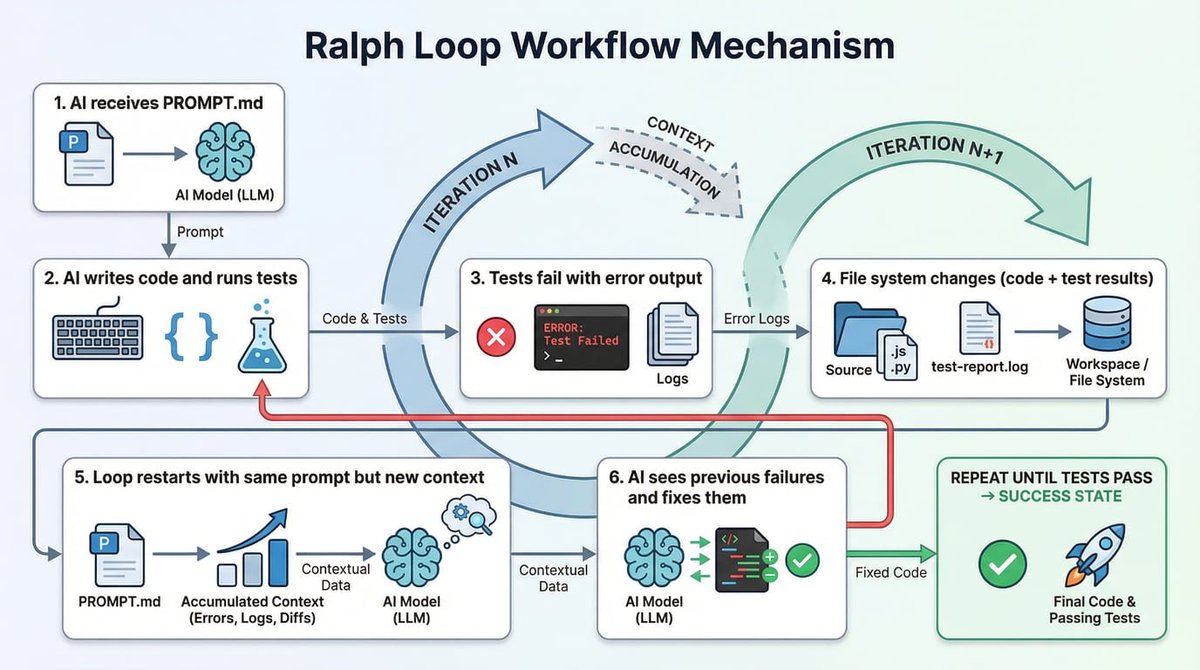
This loop creates a “self-referential feedback system”:
-
The AI receives a prompt (e.g., “Implement feature X, pass all tests”). -
The AI writes code and runs tests. Let’s say 3 tests fail. -
The loop restarts. The same prompt is fed again, but now the AI sees a changed file system state—code files exist, test output is present. -
The AI reads the new context (especially the failure messages), debugs, and fixes the code. -
This process repeats until all tests pass.
(Illustration: The self-referential feedback cycle of Ralph Loop. The prompt is fixed, but the file system state changes with each iteration, providing new context for the AI.)
Two Foundational Implementations: Official Integration vs. Minimalism
The original Bash script, while pure in concept, wasn’t convenient. The community quickly developed two more practical foundational implementations.
1. Claude Code Official Plugin: The Built-in “Stop Hook”
Anthropic’s Claude Code team productized the Ralph concept into an official plugin. Its core innovation is the “Stop Hook” mechanism.
How does it work?
Traditional external loops require launching new sessions repeatedly. The Claude Code plugin implements the loop within a single session:
-
Intercepts Exit: When Claude attempts to exit, the plugin intercepts it. -
Checks Completion: The plugin checks the output for a user-defined completion tag (e.g., <promise>COMPLETE</promise>). -
Blocks & Injects: If not complete, the plugin prevents session exit and automatically injects a new prompt to begin the next iteration.
How to use it?
After installing the plugin, usage is straightforward:
/ralph-loop “Build a REST API for a TODO app with CRUD operations, input validation, and unit tests. Output <promise>COMPLETE</promise> when done.” \
  --max-iterations 50 \
  --completion-promise “COMPLETE”
Characteristics & Ideal Use Cases:
-
Pros: No external scripts needed; maintains coherent context within a single session; easy to use. -
Limitations: Relatively basic iteration count and cost control. -
Best For: Rapid prototyping, short-term tasks (under an hour), or projects deeply integrated into the Claude Code ecosystem.
2. The Ryan Carson Version: Tool-Agnostic Explicit Control
Ryan Carson’s implementation returns to Huntley’s original philosophy: minimalist, explicit, and compatible with any AI CLI tool.
Core Script Logic:
for i in $(seq 1 $_ITERATIONS); do
  OUTPUT=$(cat prompt.txt | amp --dangerously-allow-all 2>&1)
  if echo “$OUTPUT” | grep -q “<promise>COMPLETE</promise>”; then
    exit 0
  fi
done
Project Structure:
scripts/ralph/
├── run.sh              # Main loop script
├── prompt.txt          # Core AI instructions
├── prd.json            # User story task list
└── progress.txt        # Learning log (transfers knowledge across iterations)
Core Features:
-
Fresh Context: Each iteration is a clean start for the AI, avoiding context contamination from long sessions. -
Knowledge Accumulation: The progress.txtfile acts as a “codex,” recording project learnings for future iterations. -
High Flexibility: Can pair with any command-line AI tool like amp,claude, orcursor.
Best For: Projects involving multiple tasks/user stories, planned for long, unattended runs (hours or overnight), or developers not using Claude Code.
Two Production-Grade Evolutions: Tackling Cost and Drift
When basic Ralph Loops were deployed in production, they exposed two core issues: uncontrolled cost and task objective drift. The open-source community addressed these with two representative advanced solutions.
1. Vercel Labs: A Double-Loop Architecture for Developers
Vercel Labs deeply integrated the Ralph concept into its AI SDK. The core innovation is a double-loop architecture.
How does it work?
-
Inner Loop (Tool Loop): The AI SDK calls tools as usual (writes code, runs tests, etc.). -
Outer Loop (Ralph Loop): After the inner loop finishes, the system automatically executes a developer-defined verifyCompletionfunction to check if the task is truly complete (e.g., all tests pass, performance benchmarks are met). -
Feedback Injection: If verifyCompletionreturns “not complete” with a reason, this reason is injected as a system message into the next iteration’s context, guiding the AI to make targeted fixes.
Key Advantage: Programmable Cost Control
Vercel’s implementation allows you to set precise stopping conditions, preventing budget overruns:
stopWhen: [
  iterationCountIs(50),           // Maximum 50 iterations
  totalCostIs(10.0),              // Total cost not to exceed $10
  totalTokenUsageIs(200000)       // Total token usage not to exceed 200k
]
Best For: Developers already using the Vercel AI SDK stack, working on singular, well-defined tasks (like code migration, bulk refactoring), and requiring precise cost control.
(Illustration: Vercel’s double-loop architecture. The outer loop validates via the verifyCompletion function and injects failure reasons as feedback for the next iteration.)

2. Zenflow: The Spec-Driven “Controlled Loop”
Zenflow is a standalone desktop application based on a core philosophy: “A loop without an anchor will drift.” It embeds the Ralph loop within a rigorous “Spec-Driven Development” (SDD) workflow.
Core Architecture: Markdown Files as a State Machine
The entire workflow is defined and managed by a structured Markdown file (workflow.md):
.zenflow/tasks/{task_id}/
├── workflow.md      # Executable workflow definition & log
├── spec.md          # Requirement specifications (immutable anchor)
├── report.md        # Execution report
└── changes/         # Code change records per iteration
Self-Modifying Plan Mechanism: Zenflow’s loop isn’t restarted by an external script. Instead, the AI agent, upon completing a step, modifies the workflow.md file itself, appending the next step. Zenflow detects the file change and automatically executes the new step. This ensures the loop always progresses toward the planned goal.
The “Committee Method” Multi-Model Review
Zenflow’s research found that having different large language models review each other’s work is more effective than a single model iterating. A typical workflow might involve:
-
Implementation: Code generated by Claude Opus. -
Review: Code reviewed by GPT-4o to find potential issues (different models have different “blind spots”). -
Fix: Claude Opus makes fixes based on review feedback. -
Final Verification: A final check performed by Gemini Pro.
The “Golden Three Iterations” Rule
Based on empirical data, the Zenflow team proposes that most tasks converge to a correct solution within 1 to 3 iterations. Beyond three, AI tends to start “over-optimizing” or “drifting in direction.” Therefore, Zenflow advocates a “fail-fast” philosophy, enforcing iteration limits to prevent wasted resources.
Best For: Teams managing complex, multi-step development processes; projects worried about long-run objective drift; and developers wishing to leverage multiple models to enhance code quality.
(Illustration: Zenflow’s “Committee Method” workflow, utilizing different LLMs for implementation, review, and verification to improve output quality.)

Technical Trade-offs: Which Version Should I Choose?
To help you decide, here is a clear comparison:
Selection Advice:
-
Choose Claude Code Official: If you’re already a Claude Code user wanting the simplest Ralph Loop experience for short tasks. -
Choose Ryan Carson Version: If you prioritize maximum flexibility and control, don’t rely on a specific tool, or need long unattended runs. -
Choose Vercel Ralph Loop: If your project is TypeScript/Vercel AI SDK-based and requires granular cost control and programmable integration. -
Choose Zenflow: If you face complex, multi-step development processes, are highly concerned about goal drift, and want to leverage multi-model capabilities for code quality.
Ralph in the Real World: What Can It Do, and What’s the Cost?
Theory is good, but practice is key. Let’s examine some real cases.
Case 1: Developing a Complete Programming Language
Geoffrey Huntley himself used Ralph technology to develop a full programming language called CURSED over 3 months with minimal intervention, including compiler, standard library, editor support, and documentation. He only adjusted instructions in prompt.txt when necessary.
Case 2: Hackathon Bulk Production
During a Y Combinator hackathon, participants used Ralph to automatically generate 6 complete code repositories overnight. This demonstrates its powerful batch development and unattended operation capabilities.
Case 3: Stunning Cost Efficiency
A developer reported using the amp tool with a Ralph loop to complete a 297, a cost ratio of just 0.594%. This sparks deep thought about the economics of AI development.
Case 4: The Community’s “Sweet Problem”
Real feedback also comes from the r/ClaudeCode subreddit. One user reported a bug: one project’s Ralph loop accidentally hijacked another project’s session, consuming 14% of the monthly quota in 2 hours. The solution was using Git Worktrees to create isolated directories for each Ralph task. Another user aptly summarized: “Ralph is powerful… but using it the first time requires faith and trust in the final outcome. Ralph will test you.”
Controversy and Reflection: Safety, Cost, and the Future of “Human-in-the-Loop”
The “brute-force iteration” philosophy of the Ralph Loop is not without controversy.
Cost: The Most Tangible Challenge
Ralph’s biggest expense is token consumption. Community data shows a 50-iteration autonomous loop might consume 10-15% of a weekly quota. Therefore, always setting the --max-iterations parameter is not optional; it’s mandatory. The key is trade-off analysis: if Ralph completes 20 hours of manually-guided work in 2 hours, even with 15% quota consumption, the return on investment can be substantial.
Safety: The Risk of “Degradation” Through Iteration
A 2025 study, Iterative Safety Degradation in AI Code Generation, highlighted a concerning phenomenon: in pure LLM feedback loops, code safety can systematically degrade with increasing iterations. Initially secure code might inadvertently introduce new vulnerabilities like authentication bypasses or SQL injection after multiple rounds of AI “improvement.” This warns us that for security-sensitive tasks, we cannot fully relinquish control to autonomous AI loops. Introducing read-only proxy agents for security checks or retaining human review at critical points is necessary.
A Fundamental Shift in Mindset
Ultimately, the Ralph Loop changes the paradigm of human-AI collaboration. As tech blogger Matt Pocock stated, the new model is: “Stop forcing the AI to follow a brittle multi-step plan. Instead, let the agent simply ‘grab task cards from the board,’ complete them, and find the next one.”
-
Traditional Model: Human plans → AI executes step 1 → Human reviews → AI executes step 2 → … -
Ralph Model: Human defines success criteria → AI autonomously iterates → Achieves goal (via file system, test results, Git history feedback).
This requires developers to master a new skill: writing good goals, not good step-by-step instructions. Your prompt should not be “Do A, then do B,” but rather “Achieve state X, evidenced by passing test Y.”
How to Use Ralph Loop: A Practical Guide and Tips
What Tasks Are Suitable for Ralph?
-
Tasks with Clear, Automatable Verification Criteria
“
ralph-loop “Make all tests in the tests/auth/ directory pass. Output <promise>DONE</promise> when npm test -- auth returns exit code 0.” --max-iterations 30 -
Iterative Improvement Tasks
-
Refactoring code to comply with new style guides. -
Migrating a project from an old framework to a new one. -
Optimizing performance to meet a benchmark.
-
-
New Project or Feature Development
-
Building an API from scratch. -
Developing a one-off data processing script.
-
-
Any Task with a Full Automation Pipeline
-
Has unit and integration test suites. -
Has linter and code formatter configured. -
Has a CI/CD pipeline for automatic build and deployment.
-
What Tasks Are Not Suitable?
-
Tasks Requiring Human Judgment and Trade-offs
-
System architecture decisions (microservices vs. monolith?). -
User experience design choices. -
Security scheme reviews.
-
-
Vaguely Defined Tasks
-
E.g., “Make the app faster”—such prompts lead to aimless optimization, potentially at the cost of breaking functionality.
-
-
High-Risk Operations in Production
-
Emergency fixes for live incidents. -
Irreversible database migrations. -
Changes to payment or core business logic.
-
-
Exploratory or Research Work
-
“Analyze the root cause of the performance degradation”—this requires understanding context and intent, not just execution.
-
How to Write an Effective Ralph Prompt?
A Bad Prompt: "Build an e-commerce platform."
An Excellent Prompt Example:
## Goal
Implement a user authentication system.

## Success Criteria
1.  All tests pass when running `npm test -- auth`.
2.  No TypeScript compilation errors when running `npm run typecheck`.
3.  Includes the following functional modules:
    - JWT token generation and validation
    - Password hashing using bcrypt
    - Refresh token mechanism

## Verification Steps
After each iteration, automatically:
1.  Run `npm test -- auth`
2.  Run `npm run typecheck`
3.  If both steps above succeed, output: <promise>AUTH_COMPLETE</promise>

## Constraints
- Must use the existing `lib/jwt.ts` utility library in the project.
- Must follow security specifications in `docs/security-guidelines.md`.
- Enforce a minimum password length of 8 characters.

## Blocked Handling
If no success after 15 consecutive iterations:
1.  Document the core issue currently encountered.
2.  List attempted solutions.
3.  Suggest a possible alternative implementation path.
4.  Output: <promise>BLOCKED</promise> and halt the loop.
Key Takeaways:
-
Verifiable: Success criteria must be machine-detectable. -
Actionable: Provide concrete verification commands. -
Bounded: Clearly state tech stack, specifications, and constraints. -
Circuit-Breaker: Include a mechanism for handling stalls to prevent infinite loops.
Monitoring and Safety Measures
Intelligent Circuit Breakers: Advanced Ralph implementations can include logic to auto-halt when detecting:
-
No Progress: Multiple consecutive iterations with no file modifications. -
Repeated Errors: The exact same error message appears repeatedly. -
Quality Drop: A sudden decrease in output length or structural integrity from the AI.
The Git Safety Net: Before starting Ralph, always create an isolated branch. This is the most crucial safety measure for rollback.
# Before running Ralph
git checkout -b ralph/experiment-$(date +%s)

# To revert if results are unsatisfactory
git reset --hard origin/main
(Illustration: An ideal Ralph Loop monitoring dashboard showing iteration progress, token consumption, cost estimation, and live logs.)

The Future: How Far Are We From Autonomous Tools to Autonomous Intelligence?
The Ralph Loop demonstrates powerful AI autonomy within constrained domains (clear goals, verifiable outcomes). But it also clearly delineates the current boundaries of AI capability.
What Ralph Can Do:
-
Make tests pass. -
Fix compilation and type errors. -
Implement features per explicit specifications. -
Refactor code within fixed patterns.
What Ralph Cannot Do (And Where AGI Needs to Break Through):
-
Understand Business Intent: Why is this feature needed? What’s its business value? -
Make Long-Term Architectural Trade-offs: What impact will today’s code choice have on system maintainability in three years? -
Truly Innovate Problem-Solving: Propose novel, elegant solutions. -
Transfer Knowledge Across Domains: Apply lessons learned from compiler development to database index design.
2026 research is beginning to focus on “feedback loop safety degradation” and “risks of recursive self-improvement.” This reminds us that while pursuing autonomy, human-defined goals, set boundaries, and supervision at critical junctures remain irreplaceable safety valves.
Geoffrey Huntley’s summary is profound: “Ralph requires faith and trust in the final outcome. Every time Ralph goes in the wrong direction, I don’t blame the tool—I check my prompt and adjust it. It’s like tuning a guitar.”
This is perhaps the greatest insight from the Ralph Loop: it elevates the core skill of the human developer from “micro-managing AI step-by-step” to “precisely defining macro goals and success criteria.” This is progress—a path toward more efficient human-AI collaboration. The journey that began with a five-line loop on an Australian farm is, through the practice of global developers, iterating toward a new future.
As Ralph Wiggum himself might say: “I’m helping!”—in a way we never anticipated.
Frequently Asked Questions (FAQ) About Ralph Loop
Q1: How is Ralph Loop different from a regular AI coding assistant like Copilot?
A1: Regular AI assistants are reactive, requiring you to constantly provide the next instruction. Ralph Loop is proactive and autonomous. You give it a final goal, and it will plan steps, execute, encounter failure, learn, and retry in a loop until the goal is met, all without step-by-step guidance.
Q2: Is using Ralph Loop extremely expensive?
A2: It does consume more tokens than a single interaction due to multiple AI calls. The key is setting reasonable constraints (like max iterations, cost caps) and weighing cost versus benefit. If a multi-day development task can be completed in hours for a few dozen dollars, the ROI can be very high. Monitoring and budgeting are essential.
Q3: I’m concerned the AI will “drift off course” during the loop, forgetting the original goal.
A3: This is the “goal drift” risk, a weakness of the original Ralph. That’s why advanced versions like Zenflow introduce “specification anchors” (spec.md) to repeatedly realign with the goal, and the Vercel version uses the verifyCompletion function to check for deviation after each iteration. Writing clear, verifiable success criteria in your prompt is the first line of defense against drift.
Q4: Is the code generated by Ralph high quality and secure?
A4: Quality depends on how strict your “success criteria” are (e.g., does it include rigorous tests and linting?). Security is a known risk; research shows pure AI loops can introduce vulnerabilities. Best practices are: 1) Retain human review for security-sensitive parts; 2) Use methods like Zenflow’s “committee approach” where different models review each other’s code; 3) Integrate security scanning tools within the loop.
Q5: Do I need deep programming knowledge to use Ralph effectively?
A5: On the contrary, Ralph can lower the barrier to implementing complex features. However, your core required skill shifts: from “knowing how to code step-by-step” to “knowing how to clearly define problems, set verification standards, and write high-quality prompts that the AI understands.” This is a higher-level architectural and design capability.
