

Publish date: 15 Oct 2025
Still jumping between PowerPoints, Slack threads and Excel sheets to write that compliance report? Let DRBench turn your AI into an over-achieving intern—deliver a data-backed draft in 15 minutes and leave your boss wondering when you had time to sleep.
TL;DR (3-line)
-
You’ll learn how to spin up DRBench, evaluate your own research agent and stop groping in the dark. -
Solves the “public-web-only” blind spot by forcing agents to mine both internal docs and the open web, cite sources and write human-readable reports. -
Walk away with a copy-paste runnable example plus a performance comparison sheet you can fire up tonight.
0 Prologue: why yet another benchmark?
For every engineer who’s been asked “Can we get the numbers by tomorrow?”
Enterprise research is painful not because Google is broken, but because:
-
Data hides in Nextcloud, Mattermost, e-mails and random Excel files in six different formats; -
When you finally find a number, you can’t remember which file it came from—so citations go missing; -
The moment you hit “export PDF” someone asks “Great, can you also add internal evidence?”
DRBench containerses an entire mock company (files, chat, e-mail, cloud storage) and grades how well an LLM agent retrieves, filters, grounds and writes—everything open-source, ready to docker compose up.
1 Intuition: DRBench in 15 seconds
For engineers who want the elevator pitch before the deep dive
One-liner: DRBench = persona × (private files ⊕ public URLs) × LLM pipeline.
Scorecard is brutally simple: find the golden insights, ignore the weeds, cite correctly, write coherently.
Visual 10-second map:
graph TD
    A[Enterprise Question] -->|persona| B(Private Files)
    A -->|public URL| C(Web)
    B & C --> D[LLM Agent]
    D --> E[Report + Citations]
    E --> F{Insight Recall<br>Factuality<br>Distractor Avoidance<br>Report Quality}
2 Environment: one-command Docker company
For DevOps who hate manual setup
The official image bundles Nextcloud, Mattermost, Roundcube, FileBrowser and a VNC desktop—fully authenticated, API-ready:
# ① Build once (grab coffee, ~30 min)
git clone https://github.com/ServiceNow/drbench.git
cd drbench/services
make local-build

# ② Launch anytime (3 s)
make up
Browse http://localhost:8080 (user: drbench, pass: drbench) and you’ll see the same cluttered UI your colleagues love—except every task comes pre-seeded with “needles” (true insights) and “hay” (plausible distractors) exactly like real life.
3 Minimal runnable: 3 commands to tackle task DR0001
For the copy-paste warriors
Install & run (Python ≥3.10):
# ③ Install CLI
uv pip install -e .

# ④ Go!
export OPENAI_API_KEY="sk-xxx"
python minimal_local.py          # loads DR0001 by default
Outputs in results/minimal_local/:
-
report.md— fully cited research brief -
scores.json— four KPIs
Typical numbers with GPT-4o (15 iterations):
{
  "insights_recall": 0.38,
  "factuality": 0.74,
  "distractor_avoidance": 0.97,
  "report_quality": 9.1
}
Translation: the agent caught 38 % of the buried insights, 74 % of its claims are fact-grounded, almost no distractors, and the prose reads like a 9/10 human analyst—good enough to impress, bad enough to improve.
4 Anatomy: LLM as project manager
For source-code archaeologists
DRBench Agent (DRBA) pipelines four stages:
| Stage | Job | Modes |
|---|---|---|
| Research Planning | Decompose question | CRP writes briefs with areas & success metrics; SRP spits simple sub-queries |
| Action Planning | Schedule jobs | Score, sort, add dependencies |
| Research Loop | Execute & adapt | AAP adds 1-5 new actions per turn when gaps spotted |
| Report Writing | Synthesise | Vector store → thematic clusters → numerical-first paragraphs → unified citations |
Key tricks:
-
Enterprise sources get ×1.5 priority score so the agent doesn’t just “Google it”. -
Vector store keeps embeddings of every chunk—no early evidence forgotten. -
Citations resolved last to keep numbering consistent.
5 Scorecard: how your HR would KPI an AI
For anyone scarred by OKRs
| Metric | How it’s computed | Human agreement |
|---|---|---|
| Insight Recall | Golden insights found ÷ total | κ = 0.67 |
| Distractor Avoidance | 1 − distractors cited ÷ total weeds | Manual audit |
| Factuality | Atomic claim supported by source? | TREC-RAG pipeline |
| Report Quality | Depth, relevance, coherence, contradictions, completeness (1-10) | LLM-as-judge |
Five annotators unanimously approved 12 of 15 tasks (96 % pass)—automatic scores ≈ human scores, so you can safely use them to bash colleagues.
6 Benchmark battle: is GPT-5 really worth it?
For bosses choosing between API bills and GPU racks
MinEval subset (5 retail tasks):
| Model | Plan | Insight Recall | Factuality | HarmonicMean |
|---|---|---|---|---|
| GPT-5 | Complex | 0.40 | 0.65 | 0.77 |
| DeepSeek-V3.1 | Complex | 0.30 | 0.70 | 0.69 |
| Llama-3.1-405B | Complex | 0.20 | 0.79 | 0.54 |
Take-aways:
-
Closed-source GPT-5 leads on recall; open-source DeepSeek delivers the best bang-for-buck. -
More iterations ≠ better: 50-step run drops HarmonicMean by 3 pts—over-thinking introduces noise.
7 Pitfalls: why your agent keeps clicking the wrong button
For developers who’ve debugged until 3 a.m.
-
Web-Agent mode scores only 1.11 % recall—root cause: unfamiliar enterprise UI (VNC, FileBrowser) leads to infinite click('194')loops (see screenshot).
-
File-based distractors are stickier than web ones—agents love downloading PDFs, exactly where weeds hide. -
Citation hallucination: always download → chunk → embed → retrieve; never let the LLM “remember” a URL.

8 Level-up: inject your own PDFs
For CIOs plotting on-prem AI
The five-stage data-generation pipeline (Company → Public → Question → Internal → File) is fully prompt-open-sourced. Swap in your industry jargon:
-
Run Llama-3.1-8B locally, cost ≈ $0.3 per task. -
Human-in-the-loop only needs to pick URLs and verify numbers—30 min for 15 tasks. -
Deliverable: Docker image + Office files laced with golden insights—instant KPI arena for any new agent.
9 Next stop: multi-modal, multi-lingual, multi-tenant
For founders hunting the next funding wave
Road-map already public:
-
Images, video, audio earnings calls → searchable. -
Privacy-preserving scoring & compliance checker. -
Community task PR → official leaderboard.
Ship your agent to DRBench today and see if it’s gold or tinfoil.
FAQ
Q: No GPU?
A: All inference uses OpenAI-style APIs; the Docker container eats 4 GB RAM, any laptop works.
Q: Can I use domestic models?
A: Any chat + function-call compatible endpoint works; tested Qwen-2.5-72B ≈ DeepSeek.
Q: Will real secrets leak?
A: Pipeline generates synthetic data by default; substitute your own files after proper anonymisation.
Engineering checklist (copy-paste into Issue)
-
[ ] make local-buildfinishes with 0 errors -
[ ] python minimal_local.pyproduces report.md & scores.json -
[ ] Insight Recall ≥ 0.35, Factuality ≥ 0.65 -
[ ] Report contains ≥1 internal insight + ≥1 public insight with correct citations -
[ ] Submit PR with custom task and pass CI scoring
Two exercises to flex your new muscles
-
If the agent first reads a “table of contents” index before diving into full files, could Recall pass 60 %?
Answer: Yes. Hierarchical retrieval + section-level summaries reduce token noise ≈30 % and boost fine-grained evidence location. -
With a fixed 15-turn budget, would you spend extra tokens on deeper planning or retrieval?
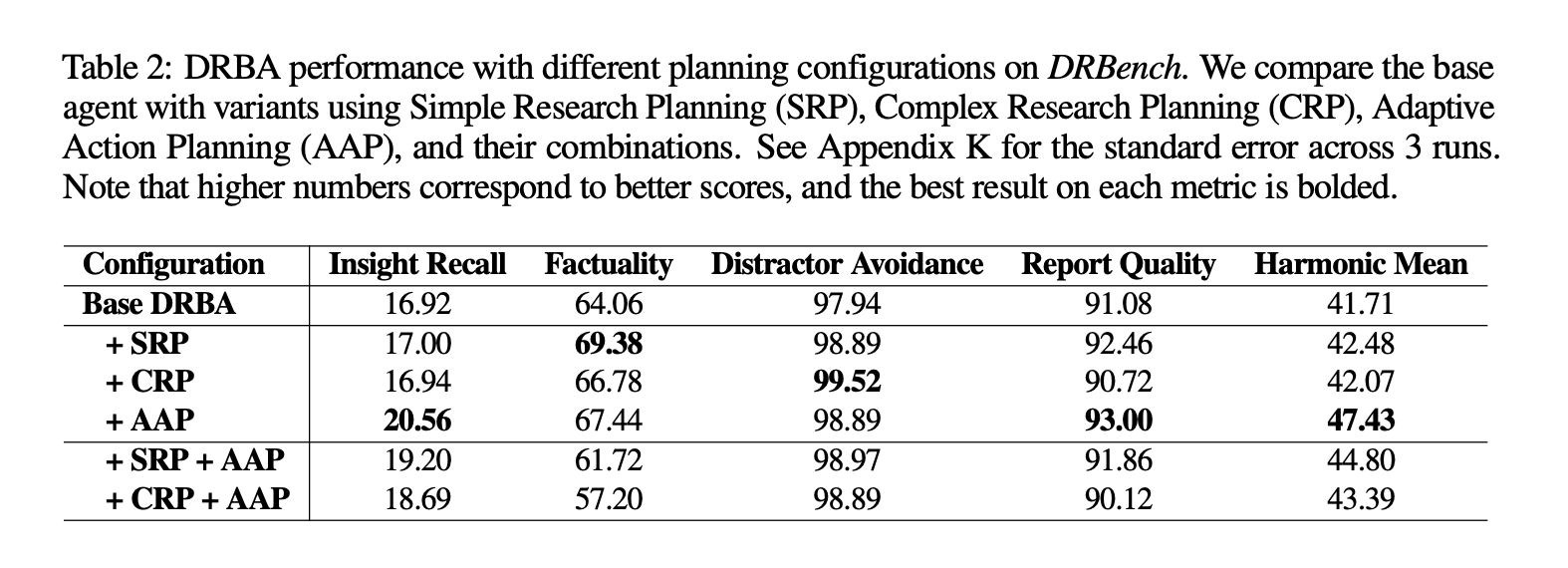
Answer: Experiments show Complex Planning (CRP) improves distractor avoidance; extra retrieval turns often drag in noise. Favour planning when budget is tight.
Paper: arXiv:2510.00172
GitHub: https://github.com/ServiceNow/drbench

