

From Chaos to Order: Managing AI Prompts with “Skills” for Reusable Workflows
Summary
This article introduces a method for managing AI prompts called “Skills”: organizing prompts, examples, and scripts in Markdown folders to make workflows reusable, shareable, and modular. It explores the three core differences between Skills and ordinary prompts—progressive disclosure, structural organization, and access to additional resources—and examines their value in standardizing team knowledge.
Introduction: When “Mostly Works” Prompts Start to Spiral Out of Control
If you use AI tools with any regularity, you’ve probably experienced this scenario: one day you cobble together a prompt that “mostly works.” Maybe it’s a checklist, a sequence of steps, or a few rules like “don’t do this” and “always check that.” You tweak it a few times until the output looks right, then save it somewhere for future reuse.
Over the following weeks, that prompt slowly evolves. After an output error, you add another rule. A line that no longer seems necessary gets deleted. A colleague copies it into a different project and modifies it to fit their habits. Before long, three or four versions of the same workflow are floating around in different places, and no one can say with certainty which one actually produces the output you want.
This is “prompt sprawl”—a problem many AI users are facing. The solution this article introduces, called “Skills,” isn’t some revolutionary new technology. It’s simply a first step toward making prompt management more systematic and reusable.
What Exactly Is a Skill?
At its core, a Skill is a way of formalizing those working habits. A Skill is essentially a collection of prompts written in a Markdown file, sometimes accompanied by reference files or scripts that the model can use during execution.
In other words, it’s not fundamentally different from regular prompting—it’s still prompting, just made reusable.
Instead of keeping instructions in a document or notes app, you place them in a folder (typically centered around a skill.md file), alongside any examples, templates, or scripts needed to make the workflow run end-to-end. That folder becomes a “Skill”—a repeatable process that an AI agent can invoke, rather than a one-off attempt.
Skills are a way of organizing prompts and resources that feels intuitive both to humans (since we still need to manage workflows across projects and teams) and to models (which understand file structures well).

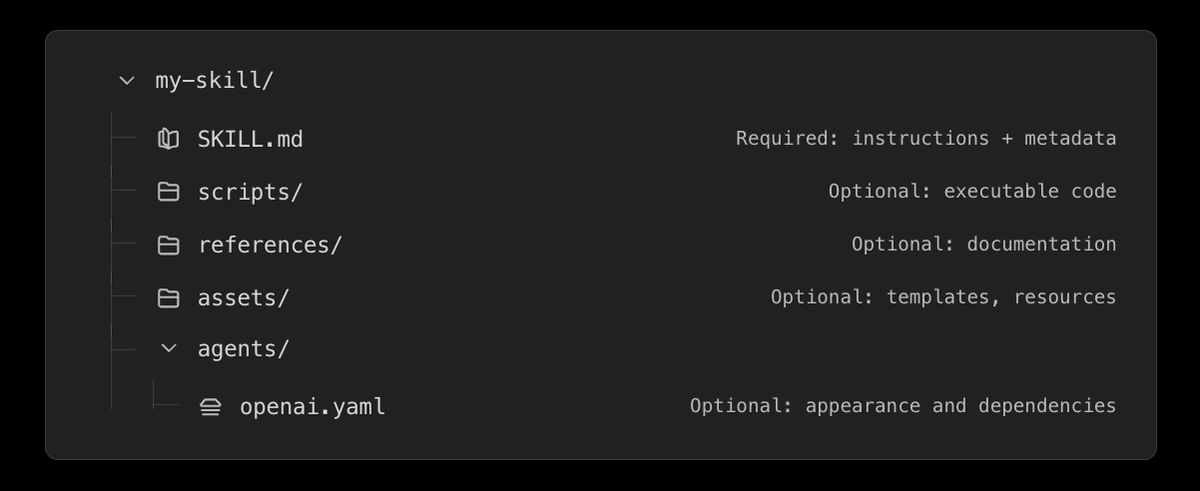
A typical Skill folder: contains a core instruction file (skill.md), an examples folder (examples/), a scripts folder (scripts/), and other supporting materials.
Why Prompting Still Matters
You might have heard people say that prompting matters less now because models are getting smarter. There’s some truth to this—you no longer need to discover magical phrases or formatting tricks to make the model behave.
But just like communicating with any human, clear and unambiguous instructions always help. The model can’t read your mind. It can only perform a task based on the instructions you provide and the context it receives.
A Skill simply lets you do the prompting work once instead of rediscovering it every time. With a well-designed Skill, the person invoking it can give much simpler instructions and still get consistent results.
Three Fundamental Differences Between Skills and Traditional Prompts
From my perspective, there are three core conceptual distinctions between reusable prompts and Skills.
1. Progressive Disclosure
You typically don’t load an entire workflow into the model’s context from the start. Each Skill comes with a brief description explaining what it does. The AI agent looks at this description to determine whether the Skill is relevant to the current task. Only when it decides the Skill applies does it inspect the full instructions in the skill.md file, or access appendices like examples folders, scripts, MCP servers, or APIs.
In practice, this behaves like a catalog of available workflows. The agent knows what tools exist but only opens the detailed instructions when needed.
Think of it like visiting a library. You start with the catalog to see what books exist on a topic. Once you’ve found a relevant book, you don’t read it cover to cover—you flip to the index or glossary to locate the exact chapter or page you need. The detailed instructions stay closed until they’re actually relevant to the task at hand.
A concrete example: Consider an image generation Skill that distinguishes between three subtasks: generating new images from text, editing existing images, and producing coherent variations as a set. Each task benefits from a different prompt template. If you loaded all three templates into context for every request, you’d waste significant capacity. Instead, the agent first sees short descriptions like “Generate a new image from a text description,” “Edit an existing image while preserving specified elements,” and “Produce a set of coherent variations.” Only when the task involves editing does it load the full editing template, including rules about which elements must remain fixed. The detailed workflow stays out of context until it’s actually needed.
2. Structure
Modern models are quite adept at navigating file systems. The fact that something lives in a particular folder already conveys information about how it should be used. Just as you organize your own desktop by project or purpose, the structure of a Skills directory provides context to the model.
This also introduces modularity. A Skill becomes a packaged workflow unit that can be reused, shared, version-controlled, or combined with other Skills. Rather than copy-pasting slightly different versions of the same prompt into every project, you can treat workflows as modules distributed across projects and team members.
3. Access to Additional Resources
A reusable prompt is usually limited to whatever text you remembered to paste in. A Skill, on the other hand, can include appendices, examples, scripts, evaluation rubrics, or even executable tools the model can use while performing the task. This might involve calling MCP servers, running CLI scripts, or referencing internal guidelines captured in a guidelines.md file.
In this sense, a Skill doesn’t just tell the model what to do—it also gives the model access to the supporting materials needed to do it well. The workflow becomes grounded not only in instructions, but in context and tools.
Why This Matters for Teams—Large or Small
Much of what counts as expertise inside an organization isn’t a collection of facts, but a sequence of habits and checks. It’s knowing what to verify before deployment, which assumptions need testing, and what kind of output is considered acceptable.
Normally, this knowledge is passed around informally or buried in outdated documentation. With Skills, that procedural knowledge can be packaged into something an agent can follow directly. In practice, this allows teams to codify and amplify expertise that would otherwise remain tacit or inconsistently applied. Everyone ends up running the same steps, and new team members don’t have to reverse-engineer the process from scratch.
This applies whether you’re in a large enterprise or working with a small team. In both cases, Skills let you standardize how recurring tasks are performed without relying on individual prompting styles or institutional memory. When the process changes, you update the Skill once rather than asking everyone to adjust their own prompts.
A practical example: In open-source software development, Skills can accelerate workflows for repetitive tasks like code review and PR drafting. A team can codify their code review standards (what to check, what tone to use, how to handle conflicts) into a Skill. New members can invoke it before submitting PRs and receive feedback aligned with team style from the start.
In Practice: Identifying Tasks You Can “Skillify”
Skills don’t expand what models are capable of doing, but they make it easier to perform repeatable tasks in a predictable way. They let you codify and share processes instead of relying on memory or copy-paste.
If you find yourself repeating the same process more than two or three times (writing weekly reports, handling customer feedback, checking deployment configurations), that’s usually a sign it can be turned into a Skill.
What Skills introduce isn’t new capability—it’s a way to turn tacit processes into something explicit, shareable, and consistently executable.
Frequently Asked Questions (FAQ)
Q: What’s the difference between a Skill and a regular prompt file?
A: A Skill contains not just prompts but also supporting resources like examples, scripts, and evaluation criteria. More importantly, a Skill’s folder structure (with progressive disclosure and modularity) enables AI agents to use it more efficiently, while a regular prompt file is often an isolated text document.
Q: Do I need special software to use Skills?
A: No. A Skill is simply a conventionally organized folder (containing Markdown files, etc.). Any AI tool that can read file systems (such as certain AI agent frameworks) can use it directly. You can maintain these folders with whatever editor you prefer.
Q: How do I share Skills with my team?
A: Since Skills are folders, you can share them via Git, cloud storage, internal knowledge bases, etc. Team members copy them into their own Skills directories and can use them immediately. Version control becomes much easier too.
Q: What’s the difference between a Skill and a plugin?
A: Skills focus on standardizing and reusing prompts—they aren’t necessarily executable code. Plugins are typically packaged functional modules that may contain code. Skills can invoke plugins, but Skills themselves describe processes.
Q: How do I ensure models actually follow the instructions in a Skill?
A: Skill design leverages models’ ability to understand file structures and follow instructions. Clear structure, progressive disclosure, and examples significantly improve execution consistency. However, final results still depend on model capabilities and instruction quality.
How to Create a Skill (Step-by-Step Guide)
Here’s a simple process you can adapt to your own workflows.
Step 1: Identify a Recurring Task
Choose a task you perform at least weekly with relatively fixed steps—for example, “write project weekly reports,” “review code PRs,” or “generate meeting minutes.”
Step 2: Write the Core Instructions
In a Markdown file, clearly describe the task’s goal, steps, and constraints. Include elements like:
-
Role definition (“You are a senior project manager”) -
Step-by-step execution guide -
Mandatory checklists -
Output format requirements (Markdown tables, JSON, etc.)
Step 3: Add Examples
Place 1–3 examples of ideal outputs in an examples/ subfolder. This helps models understand your expectations more accurately.
Step 4: Prepare Helper Scripts or Reference Files
If needed, add executable scripts (Python, Shell, etc.) in a scripts/ folder, or background materials in a references/ folder. Models can read these resources during task execution.
Step 5: Write a Brief Description
At the beginning of your Skill folder (or directly in skill.md), summarize the Skill’s purpose in one sentence—for example, “Generate code review comments that comply with team standards.” This is the key information agents use to decide whether to invoke the Skill.
Step 6: Place It in Your Skills Directory
Move the entire folder into your AI tool’s designated Skills path (e.g., ~/.skills/). The tool should automatically recognize it and make it available for invocation.
Step 7: Test and Iterate
Invoke the Skill a few times with real tasks, observe the outputs, and refine the instructions and examples until results are consistently satisfactory.
Conclusion
Skills aren’t a revolutionary new capability—they’re simply the next logical step in the prompting practices we’re already familiar with: making prompts manageable, reusable, and collaborative. For individuals, Skills save time spent on repetitive work. For teams, they allow professional expertise to be documented and standardized.
If you’re tired of re-tuning prompts for every new project, give the Skills approach a try. You might discover that the workflows previously locked in your head can finally be written down and handed over to AI for stable, repeatable execution.
This article is based on Gabriel Chua’s explanation of the “Skills” concept and is intended to provide an intuitive understanding.

