

Skills, Commands, Agents, Plugins: Decoding the 4 Key AI Concepts
In the rapidly evolving landscape of AI technology, if you are a frequent user of various AI tools—especially coding assistants like Claude Code—you have undoubtedly encountered these four terms in official documentation, community discussions, or technical blogs: Skills, Commands, Agents, and Plugins.
These concepts are ubiquitous. They all seem related to “enhancing AI capabilities,” but if you look closely, it is easy to get dizzy. What are the actual differences between them? Are they overlapping functions? Which one should I use in a specific scenario?
Recently, a community member raised a classic question that represents the confusion of most users: “With AI booming lately, I’ve been studying enthusiastically, maybe too hard, and suddenly some concepts are blurry. Skills, Commands, Agents, Plugins… Everyone is discussing them. They are closely related. May I ask: What are the differences in their main structure and function? In what scenarios are they used?”
This is an excellent question. To thoroughly clarify these four concepts, we will break down their logic using the most accessible language possible, based on deep research and actual usage experience. Once you finish this article, you won’t be confused by these terms again.


The Core Conclusion: Plugins Are Not Functions, They Are a “Packaging Mechanism”
Before diving into each concept, we must first find the key to unlocking this puzzle of concepts. That key is the definition of the nature of Plugins.
Please remember this sentence: Plugins are not a new feature; they are a “packaging and distribution mechanism.”
To make you understand this instantly, let’s use a life-like analogy.
You have definitely shopped online before. When you receive a package, what you hold in your hand is a “box” (or an envelope). But you didn’t buy the box itself; what you actually wanted is the content—maybe a piece of clothing, a pair of shoes, or a few books.
In the world of Claude Code, Skills, Commands, and Agents are the “goods” you purchased (the actual functions), while Plugins are the “boxes” that hold these goods.

Is a box a type of product? Obviously not. The function of a box is to deliver the product to your hands safely and conveniently.
Similarly, Plugins are not a “function” in the same way Skills or Commands are. Plugins are a mechanism designed to allow functions to be shared, installed, and copied.
A single Plugin can contain Skills, Commands, Agents, and even Hooks, MCP connections, and other configurations all at once. It bundles these disparate but related items together so you can install them all with a single command.
Understanding this explains the most confusing part of these four concepts. Plugins are the “distribution layer,” while the other three are the “functional layer.” They are not on the same dimension.
So, what roles do Skills, Commands, and Agents play as functional components? Let’s unpack them one by one.
Skills: The “Operation Manual” for AI
What are Skills?
You can think of Skills as the “operation manual” or “work guide” for AI.
Imagine this workplace scenario: You hire a new intern (Claude). As a busy supervisor, you certainly don’t want to teach them from scratch every time they encounter a problem on how to do code reviews, how to write commit messages, or how to run tests. That wastes too much time.
So, you spend time writing a detailed operation manual and place it on their desk. The next time they encounter this type of task, they just need to flip through the manual themselves to know the standard process and what standards to follow.
In Claude Code, Skills are exactly this kind of “operation manual.”
From a structural perspective, it is usually a directory containing Markdown files, scripts, and configuration files. The purpose of these files is to tell Claude: “When you encounter this type of task, follow these steps and use these standards.”
The Biggest Feature of Skills: Context-Aware Triggering
The most special and intelligent part of Skills is that they are “triggered on demand” (or context-aware).
You don’t need to explicitly tell Claude “use this specific Skill” every time. You just describe your task, and Claude will automatically determine based on the context: “Oh, I’ve seen this situation in the manual; I have a ready-made solution.” It then automatically loads the relevant Skill to execute.
To give you a more intuitive understanding, here is a real-world case.

The image above shows Claude Code using a Skill to automatically research character relationships in the classic novel Dream of the Red Chamber and generate a visualization graph (partial view).
In this scenario, you don’t need to teach it step-by-step how to extract characters or draw graphs. You just need to provide it with a Skill containing the relevant knowledge, and it can identify the task requirements and apply them automatically.
The Blurry Boundary Between Skills and Commands
Although we primarily define Skills as “auto-recognizing,” their boundaries aren’t actually that rigid. As long as you write a Skill, you need to give it a name in the description area.

Once it has a name, things get interesting. In Claude Code, you can manually call that Skill using a slash (/) followed by its name, just like calling a normal Command.

This teaches us a lesson: don’t understand concepts too mechanically. Although the strength of a Skill is auto-recognition, if Claude Code fails to understand your intent and call it automatically, manually invoking it via a slash command is also a simple and effective solution.
Commands: The Simple and Direct “Remote Control Button”
If Skills are a thick operation manual, then Commands are the simplest “remote control button.”
The logic of Commands is very intuitive: You press a button, and it executes an action.
For example, if you configure a Command named /deploy in your code. When you need to deploy the project, you only need to type /deploy, and Claude will immediately execute the preset deployment process. Or you type /review, and it starts the code review.
There is no automatic recognition here, no complex intelligent judgment, and no “thinking based on context.” It is purely: You press, it does.
The Structure of Commands
Commands are usually just a Markdown file containing prompt templates. Its structure is very simple and extremely quick to get started with. You don’t need to create folders or place multiple files like you do for configuring Skills; you just need to define the trigger word and the corresponding instruction.
Core Differences Between Commands and Skills
So, how should you choose between Commands and Skills? Their core difference lies in: Who decides when to trigger?
-
Commands are “You Pressing the Button”: The control is entirely in your hands. You want it to do it, and only then does it do it. This is suitable for operations that are used occasionally, or when you need absolute control over the timing of execution. -
Skills are “AI Auto-Recognition”: You partially cede control to the AI. You hope the AI can more smartly perceive the context and automatically help you do something at the right moment, rather than you giving an order every time.
For example:
If you have an operation with very clear trigger conditions (e.g., “I want to deploy now”), using a Command is sufficient—it’s simple and direct.
But if the trigger conditions are somewhat vague, or you want the AI to automatically realize within a complex conversation that “now is the time to use this specification,” then you should use Skills.
Agents: The “Intern” Who Thinks for Themselves
Next, let’s talk about the “heaviest” and most intelligent of the four concepts—Agents.
If Skills are a passive “operation manual” and Commands are a rigid “remote control button,” then an Agent is a “compliant intern who can think for themselves.”
The Initiative of Agents
You give an Agent a goal, for example: “Help me finish reviewing this PR (Pull Request), and raise a comment if there are issues.”
And then? Then you don’t need to worry about it. You don’t need to press buttons step-by-step like with Commands, and you don’t need to provide detailed operation manual steps like with Skills (though it can invoke Skills).
The Agent will decide for itself:
-
Which file to look at first? -
What standards to use for review? -
How to describe a problem found? -
Does it need to check relevant documentation or code context?
It will break down the big goal of “finish reviewing the PR” into countless small steps, plan the path itself, and then execute them one by one.
Essential Differences Between Agents and Skills
This is very critical: Although both Skills and Agents involve “knowledge,” their positioning is completely different.
-
Skills provide knowledge on “How to do it”: It is a static book telling you the steps. -
Agents decide “What to do” and “When to do it”: It has a brain and adjusts its strategy dynamically based on the current situation.
Skills are passive; they sit there waiting to be called (whether manually by you or automatically discovered by AI).
Agents are active; they have their own judgment. They not only think but can also change their behavior based on environmental changes.
The Collaboration Between Agents and Skills: Overcoming Rigidity with Flexibility
Precisely because Agents possess this active adaptability, they show a very interesting interaction when facing Skills.
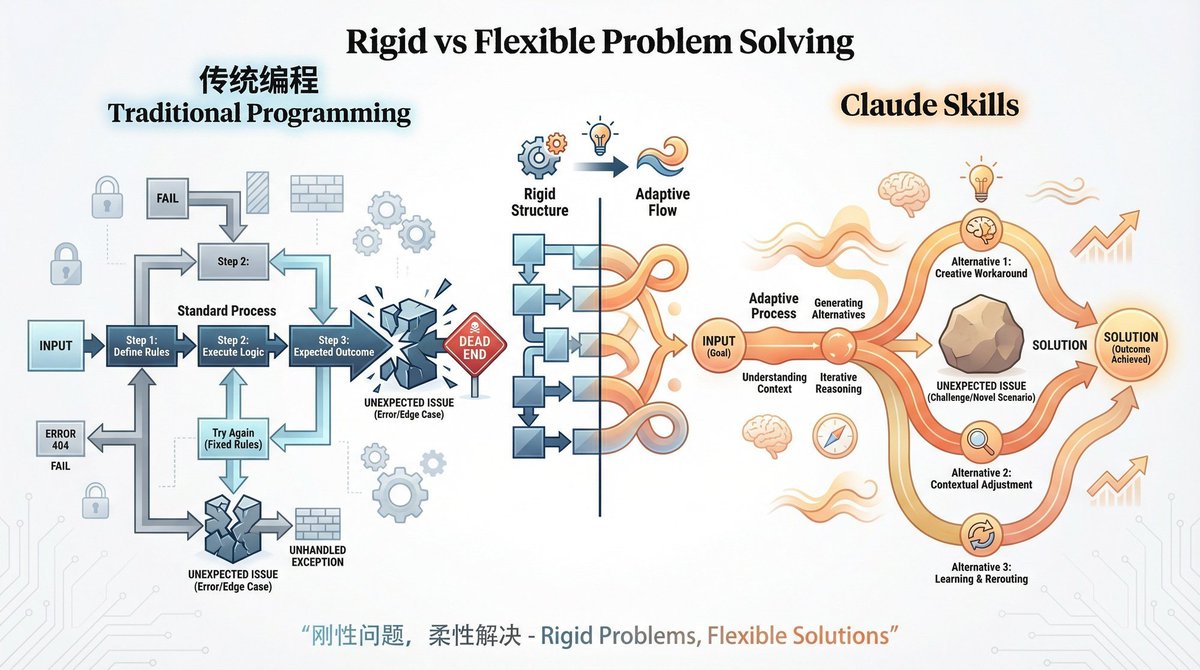
As mentioned in relevant technical discussions: Traditional programming is rigid, but Skills paired with Agents can “overcome rigidity with flexibility.”
What does this mean? Even if the Skill you wrote has some initial design flaws or isn’t perfect, a standard program might just error out or execute rigidly. But because an Agent has thinking capabilities, it will adjust how it uses the Skill based on the actual situation, or even bypass the Skill’s flaws to complete the task. It’s like viewing a Skill as a piece of moldable clay; the Agent is the sculptor who can knead that clay into the shape needed to complete the task.
The Progressive Relationship: Ceding Control and Upgrading Intelligence
At this point, we can look at these three functional components together, and you will find that they actually form a clear progressive relationship.
From Commands to Skills, and then to Agents, this is a process of progressively ceding control and progressively upgrading intelligence.
-
Commands (You press, it does): This is the most basic level. You are the operator; every step requires your hands-on trigger. 100% control is with you, and intelligence is lowest. -
Skills (It knows how to do it, loads automatically): A step up. You define the rules, but the AI helps you judge when to use them. You start handing over some “judgment power” to the AI. -
Agents (It decides what to do and how to do it): The most advanced level. You only give the goal; the process is entirely autonomously planned by the AI. Control is ceded to the AI to the greatest extent, and intelligence is highest.

You can intuitively feel this evolution from “manual” to “automatic” to “autonomous” through the image above.
Back to Plugins: Packing Your Wisdom to Go
Now, looking back at Plugins, you will have a deeper understanding.
Plugins are not on the same dimension as the three functional components above (Skills, Commands, Agents).
-
Skills, Commands, Agents are the “Functional Layer,” the ones doing the actual work. -
Plugins are the “Distribution Layer,” responsible for delivering the tools to others.
Why Do We Need Plugins?
It’s simple, for reuse and sharing.
Let’s imagine a specific workplace scenario:
Assume you are a technical team lead. You spent two weeks configuring a perfect workflow using Claude Code. This workflow includes a Skill for code review, a Command for one-click deployment, and an Agent for automatically auditing PRs.
Now, a new colleague joins the team. You definitely want them to be able to use this configuration immediately to maintain team consistency.
Without the Plugins mechanism:
You would have to send them files one by one. You would have to tell them: “Put this Markdown file in the Commands directory, put that folder in the Skills directory, then modify the configuration file…” This is not only tedious but also prone to errors.
With Plugins:
Things become incredibly simple. You only need to package this configuration (including the Skill folder, Command files, Agent configuration, etc.) into one Plugin. Then, you can publish it to the team’s Marketplace. Anthropic maintains an official plugin directory, and your team can also build an internal market.
The new colleague only needs to run one command in their Claude Code:
/plugin install my-team-config@team-marketplace
Done.
All Skills, Commands, Agents, Hooks, and MCP connections are automatically installed and configured.
This is the true value of Plugins: it turns scattered “configurations” into reusable, shareable, and versionable assets. It drastically lowers the cost of knowledge transfer within team collaboration.
Practical Guide: Which Tool Should I Use in Different Scenarios?
The concepts are clear, but when facing a specific requirement in actual work, which tool should you choose?
To make it easier for you to decide, we can organize a scenario comparison table based on our previous analysis.
| Scenario Characteristics | Recommended Use | Core Reason |
|---|---|---|
| High-frequency repetitive workflows,希望 AI 能识别上下文自动处理希望 AI 能识别上下文自动处理 | Skills | A Skill is an “operation manual,” suitable for encapsulating standard processes and has the intelligent feature of “trigger on demand.” |
| Occasional operations, or you need absolute control over the timing of execution. | Commands | A Command is a “remote control,” simple in structure; you press, and it executes. Suitable for clear trigger needs. |
| Complex, multi-step tasks requiring the AI to make decisions and plan itself. | Agents | An Agent is an “intern” with autonomy, capable of breaking down tasks and dynamically adjusting strategies. |
| Team collaboration, needing to share configuration with colleagues or the community. | Plugins | A Plugin is a “package,” the only packaging and distribution mechanism that installs all components with one click. |
A Concrete Example
Scenario 1: Writing Unit Tests
-
If you just want the AI to help you “generate tests for the current file,” using a Command like /testis most appropriate. The intent is clear, one-click execution. -
But if you want to establish a standard where the AI automatically recognizes “a test is needed here” while writing code and generates it according to team specifications, you should write a Skill. -
If your goal is “check the test coverage of the entire project and supplement test cases for weak areas,” this is a complex task. You need to bring in an Agent to plan and coordinate.
Scenario 2: Team Knowledge Base Sync
-
You can write the knowledge of how to query internal documents into a Skill, so the AI automatically consults it when answering questions. -
Then, you package this Skill, plus a Command to manually sync documents, into a Plugin. This way, any new hire who installs this Plugin immediately gives their Claude Code the ability to query the internal knowledge base.
Conclusion: Seeing Through the Fog to the Essence
Returning to our original question: Skills, Commands, Agents, Plugins—do you have them straight now?
Actually, to get these concepts crystal clear, you only need to remember two sentences:
-
The first three are “Functional Components”:
-
Skills encapsulate knowledge (operation manuals), solving “how to do it.” -
Commands provide buttons (remote controls), solving “do it immediately.” -
Agents possess autonomy (interns), solving “what to do” and “when to do it.”
-
-
Plugins are the “Distribution Mechanism”:
-
It bundles the functional components above, allowing configurations to be reused, shared, and installed with one click.
-
In this field of rapid technological change, not every new term represents a brand-new, disruptive function. Sometimes, it just represents a new way of organizing, a more efficient collaboration process.
Once you understand the distinction between the “distribution layer” and the “functional layer,” and understand how control flows between humans and AI, you will be able to see through the essence of any new term at a glance, no longer drowning in a sea of terminology.
Frequently Asked Questions (FAQ)
Q1: Can Plugins contain Commands and Agents?
A: Yes. As we emphasized in the article, Plugins are a packaging mechanism. You can put Skills, Commands, Agents, and even Hooks and MCP connections all in one Plugin. It’s like a shipping box that can hold clothes, shoes, and books at the same time.
Q2: Since Skills can trigger automatically, why do we still need Commands?
A: Not every scenario requires “automation.” The advantage of Commands is “explicit control.” When you don’t want the AI to guess your intent, or when an operation has a high cost (irreversible operation) and requires your explicit confirmation, the “press button” mode of Commands is safer and more direct.
Q3: Will Agents completely replace Skills?
A: No. Agents and Skills are complementary. Agents provide decision-making and planning capabilities, while Skills provide specific execution knowledge and standards. A smart Agent will often call upon multiple Skills to complete a task. As mentioned in the text, Agents can use Skills as flexibly as kneading clay.
Q4: How should I start trying out these features?
A: You can start by installing an existing Plugin from the official plugin directory to experience it. This is the fastest way to feel the convenience of “packaged distribution.” Then, try writing a simple Command (like /summarize), and gradually try writing your own Skills.
Q5: What if Claude Code fails to automatically recognize my Skill?
A: Don’t worry, it’s not a dead end. As mentioned in the article, because a Skill has a name, you can manually force the call to that Skill using the slash plus name method exactly like calling a Command. This is a practical trick to solve AI recognition insensitivity.

