

How to Optimize AI Agent Data Acquisition: Slashing Inefficient Token Usage by Over 90%
If you are currently deploying AI Agents using tools like OpenClaw or Claude Code, you have likely encountered a frustrating phenomenon: the “Token Assassin.” You might ask your Agent to perform a seemingly simple task—such as retrieving the latest pricing for a SaaS product—only to find that a single request has consumed tens of thousands, or even hundreds of thousands, of tokens.
This high cost of operation is often the primary barrier to scaling AI Agents from experimental toys to production-grade tools. But where does the leak come from? Is it the model? The prompt?
Through a deep dive into data acquisition architectures and real-world testing, the answer is clear: Traditional web scraping methods are fundamentally incompatible with the way AI Agents process information.
In this guide, we will break down why your current data pipeline is draining your budget and how a transition to an AI-optimized data acquisition strategy can reduce your token consumption by over 90%.
The Conflict: Why Traditional Web Scraping Fails AI Agents
For decades, we have relied on tools like curl, general web search APIs, and browser automation to fetch data from the internet. These tools were designed for two types of users: humans who read rendered pages and search engine crawlers that index keywords.
When an AI Agent uses these “human-centric” tools, it faces three fatal obstacles that lead to massive inefficiency.
1. You are providing “Implementation,” not “Content”
When you use a curl command to fetch a modern webpage, the Agent receives the raw HTML source. To a human, this page looks like a clean pricing table. To an AI, it is a “code ruin”.

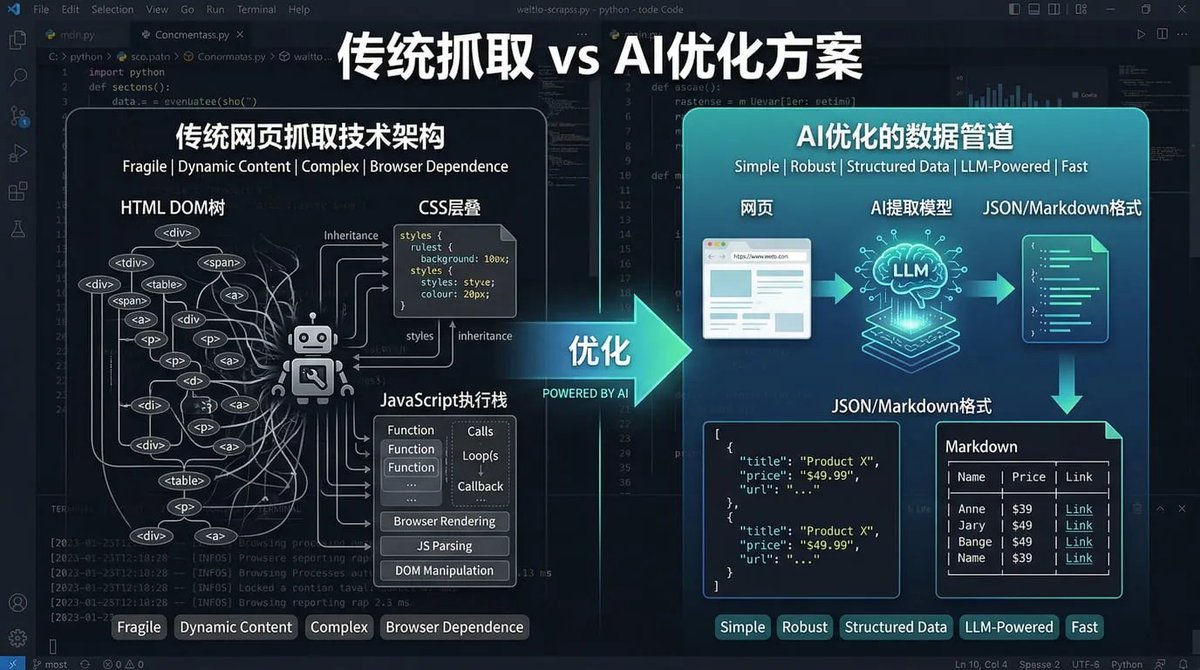
As shown in the architecture comparison above, traditional scraping is fragile and complex because it returns:
-
A massive HTML DOM tree: Thousands of lines of <div>,<span>, and<a>tags with deep nesting. -
CSS and JavaScript Noise: Inline styles, script blocks, and framework-specific rendering code (like React or Vue component markers). -
Operational Metadata: Analytics trackers, ad loaders, and telemetry scripts.
In a typical modern webpage, the actual “meat”—the semantic content your Agent needs—often accounts for only 1% to 5% of the total character count. Yet, you are paying for every single redundant character in the context window.
2. High-Security Barriers (Anti-Bot Protection)
Modern websites are increasingly sensitive to automated access. Platforms like Reddit and Zhihu employ sophisticated anti-bot measures.
-
Direct Blocks: Using standard curloften results in a 403 Forbidden error or a mandatory CAPTCHA. -
Challenge Pages: Sites protected by Cloudflare or OpenAI will return a “Challenge Page” that a headless script cannot solve. -
Dynamic Rendering: Many sites return a “skeleton” or an empty HTML shell, with the actual content loaded later via JavaScript. Traditional tools often capture only the empty shell.
When the Agent fails to fetch data, the tokens spent on the initial prompt are wasted, and the Agent may enter a loop of retries or generate “hallucinations” based on the error page.
3. The “Whole Page” Information Overload
Even if you use browser automation (like Selenium or Playwright) to successfully render and capture text, the output is often a disorganized mess of the entire page. It forces the Agent to ingest headers, footers, sidebars, and “recommended reading” sections.
The Agent is essentially forced to act as a “web page parser” before it can even begin its actual task. This “post-processing” consumes expensive reasoning tokens that should have been spent on the core objective.
Performance Benchmark: How Much Token Waste Are We Talking About?
To quantify the difference between traditional methods and AI-optimized data pipelines, we conducted tests across three real-world scenarios. For these comparisons, we estimate token usage based on a standard ratio of 1 Token per 4 characters.
Scenario 1: Tracking News and Version Updates
Task: Use an Agent to track OpenClaw version updates and summarize the top 3 core features.
| Method | Token Consumption | Summary Quality | Need for Secondary Cleaning |
|---|---|---|---|
| curl (Raw HTML) | 15,707 | Failed/Poor | High Requirement |
| Browser Snapshot | 6,103 | Average | Needed |
| AI Search Solution | 467 | Excellent | None |
On a standard Tencent Cloud developer article, the AI-optimized solution achieved a 97% saving rate. On high-security sites like Zhihu, the curl method was blocked immediately (403), while the AI solution successfully retrieved content with only 637 tokens.
Scenario 2: SaaS Pricing Analysis (The Most Extreme Case)
Task: Compare pricing plans across multiple SaaS providers and generate a comparison table.
The Notion pricing page serves as the ultimate warning for developers. Because it is built with heavy React components and embedded JSON-LD data, the raw HTML is incredibly bloated.
| Method | Token Consumption | Data Complexity |
|---|---|---|
| curl (Raw HTML) | 107,187 | Extreme: 428k characters of code |
| Browser Text | 1,371 | Moderate: Needs further extraction |
| AI Search Solution | 999 | Low: Pre-structured |
By using an AI-optimized pipeline, we achieved a 99.1% reduction in token usage. Instead of handing the Agent 107k tokens of “garbage” code, we provided a clean, 999-token data object.
Scenario 3: Community Sentiment Analysis
Task: Analyze community discussions on Reddit to identify the mainstream opinion of a product.
| Method | Token Consumption | Result |
|---|---|---|
| curl (Raw HTML) | 381 | 403 Blocked |
| Browser Snapshot | 60 | “Prove your humanity” Page |
| AI Search Solution | 12,010 | Successfully retrieved posts & comments |
In this case, the AI-optimized solution wasn’t just cheaper—it was the only method that actually worked.
The Architecture: How the AI-Optimized Pipeline Works
The transition from “Scraping” to an “AI-Optimized Data Pipeline” involves three layers of optimization specifically designed for Large Language Models (LLMs).
Layer 1: Advanced Anti-Bot Handling
Unlike traditional scripts, an AI search solution like XCrawl manages residential proxy rotation, browser fingerprinting, and JS rendering strategies natively. This ensures a success rate of over 90%, eliminating the “retry cost” associated with failed requests.
Layer 2: LLM-Friendly Content Extraction
Instead of raw code, the pipeline returns formats that the “AI Agent Core” can consume immediately:
-
Markdown: Preserves semantic structure (headings, lists) while stripping out ads and navbars. -
JSON: Ideal for direct comparison, monitoring, and database ingestion. -
Visual Validation: Provides links and screenshots for the Agent to verify its findings.
Layer 3: Pre-Structured Data Extraction
For high-frequency tasks, the system can perform “pre-understanding”. It identifies and extracts specific schemas before the data ever reaches the Agent:
-
Automatically identifying pricing tables and feature tiers. -
Extracting version numbers and release dates. -
Summarizing sentiment and mainstream viewpoints from comments.
The Bottom Line: Real Cost Savings
Let’s look at the financial impact. If you were to fetch the Notion pricing page 100 times using a GPT-4 model (estimated at $10 per 1 million tokens):
| Method | Per Request | 100 Requests | Estimated Cost |
|---|---|---|---|
| curl (Raw HTML) | 107,187 tokens | 10,718,700 tokens | ~$107 |
| AI Search Solution | 999 tokens | 99,900 tokens | ~$1 |
| Direct Savings | $106 |
Beyond the direct API costs, you also save on Engineering Overhead (no more complex regex cleaners), Failure Costs (fewer retries), and Reasoning Costs (the model isn’t wasting intelligence on “parsing” junk data).
How-To: Implementing the AI Search Solution in OpenClaw
If you want to stop the token bleed today, you can integrate a specialized tool like XCrawl, which is designed for this exact purpose.
Step 1: Install XCrawl Skills
If you are using OpenClaw, you can simply command your Agent:
“Install this skill: XCrawl.”
Step 2: Register for an API Key
Go to the XCrawl platform and register. Most new accounts receive 1,000 free calls to help you test the savings in your own environment.
Step 3: Configure Your Environment
Create a local configuration file at ~/.xcrawl/config.json and add your key:
{
  "XCRAWL_API_KEY": "<your_api_key>"
}
Alternatively, you can ask your AI Agent to handle this configuration for you.
FAQ: Optimizing Your Agent’s Data Diet
Why is AI-optimized data better than just “Text Extraction”?
Simple text extraction still leaves you with headers, footers, and disorganized snippets. An AI-optimized pipeline provides structured data (JSON/Markdown) and handles the “access” layer (anti-bot) that standard text extractors cannot touch.
Does this add latency to my Agent?
While there is a brief processing stage for cleaning and structuring data, it significantly reduces overall latency because the Agent doesn’t have to spend multiple turns “cleaning” or “re-reading” the data to find what it needs.
Is this only for pricing pages?
No. While pricing pages show the most dramatic savings, any site with high “code-to-content” ratios—like technical documentation, community forums, or news sites—will see savings between 90% and 97%.
Conclusion: AI Agents Need Data, Not Webpages
Traditional web scraping was built for an era when “browsing” was a human activity. In the age of AI Agents, we must stop treating our models like human readers who can “ignore the noise.”
The most effective way to save tokens is to stop feeding your model garbage.
By moving your data acquisition to an AI-optimized pipeline like XCrawl, you transform the web from a messy collection of code into a clean, structured data resource. Your Agents will be faster, smarter, and—most importantly—significantly cheaper to run.
Disclaimer: All token estimates are based on a character-to-token ratio of 1:4 and are intended for comparative analysis. Testing conducted on 2026-03-23.

