
CLI-Anything: Turn Any Software into AI Agent Native Tools with One Command
This article answers the core question every developer and AI builder is asking right now: How can you make any existing software fully controllable by AI Agents without rewriting APIs, scraping GUIs, or building everything from scratch?
CLI-Anything solves exactly that. It takes any software with a code repository — open source or your own — and generates a complete, production-ready CLI in one command. The result works natively with Claude Code, OpenClaw, OpenCode, Codex, Qodercli, and more. Agents suddenly gain full access to real tools like GIMP, Blender, LibreOffice, OBS Studio, and Zoom, using clean, structured commands instead of fragile screenshots or limited APIs.
The project is built on a simple truth: tomorrow’s users are Agents. Today’s software was made for humans. CLI-Anything is the bridge.

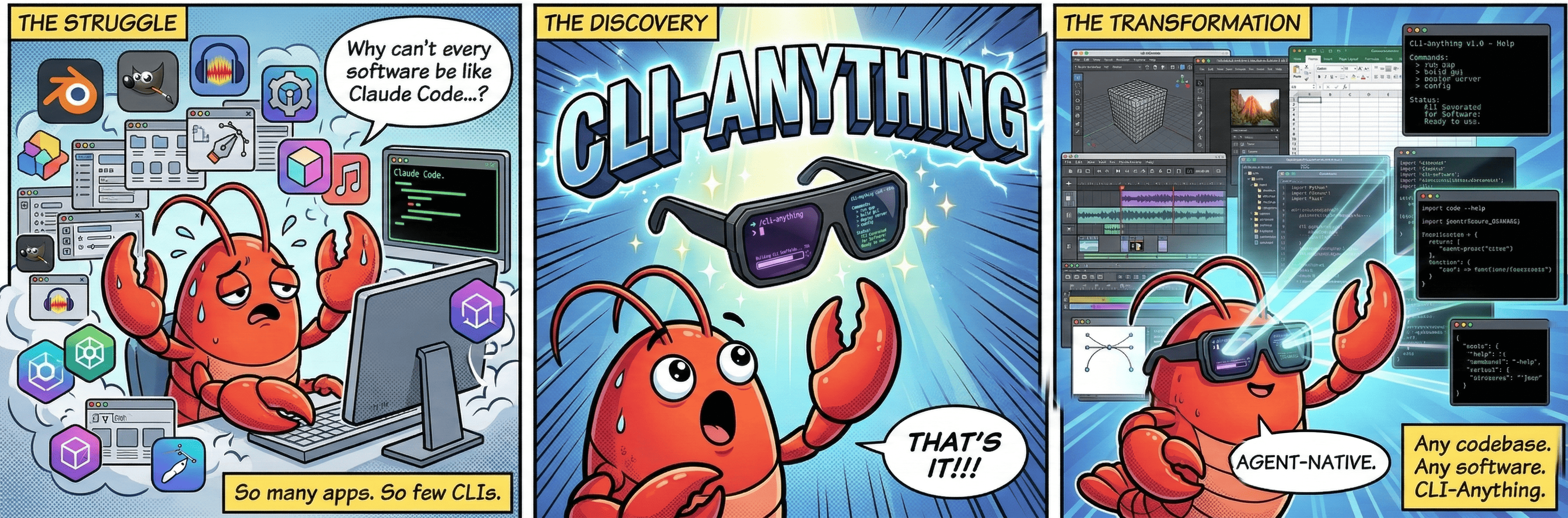
What stands out most is how practical it feels in real workflows. You point it at a codebase, it analyzes the source, maps GUI operations to APIs, designs logical command groups, builds the Click-based CLI, adds JSON output, writes tests, and even installs the package — all automatically.
Why CLI Is the Perfect Interface for Agents
This section answers: Why does CLI-Anything choose command-line interfaces over GUI automation or custom APIs?
CLI works because it is the one interface both humans and large language models already understand perfectly. Commands are structured and composable — Agents can chain them into complex pipelines without any extra parsing. It is lightweight, runs everywhere, and costs almost nothing. One --help flag lets an Agent discover every single capability instantly.
It has been battle-tested: Claude Code already runs thousands of real tasks through CLI every day. Output can be clean human-readable text or strict JSON that Agents consume directly. Behavior stays predictable and reliable.
I’ve noticed something important here. When Agents try to control software through screenshots or brittle RPA scripts, everything breaks the moment a button moves or a theme changes. CLI-Anything skips that entire class of problems. It talks directly to the software’s real backend, whether that’s bpy in Blender, headless LibreOffice, or obs-websocket.
Take a real example: an Agent needs to create a 3D product shot, add materials, render it, and then export a video overlay. With CLI-Anything, it issues structured commands to Blender, then to Shotcut, then to OBS Studio. No pixels, no timing issues, no crashes. Just reliable text commands that compose cleanly.
Quick Start — 5 Minutes to Your First Agent-Ready CLI
This section answers: What is the fastest way to get CLI-Anything running and generate your first CLI?
You need Python 3.10 or newer and the target software installed. Then pick your platform.
Claude Code (Recommended Path)
Add the plugin marketplace:
/plugin marketplace add HKUDS/CLI-Anything
Install the plugin:
/plugin install cli-anything
Windows users: make sure Git for Windows is installed so bash and cygpath are available. Otherwise you will hit path errors.
Generate a full CLI for any software:
/cli-anything:cli-anything ./gimp
Or from a GitHub repo:
/cli-anything:cli-anything https://github.com/blender/blender
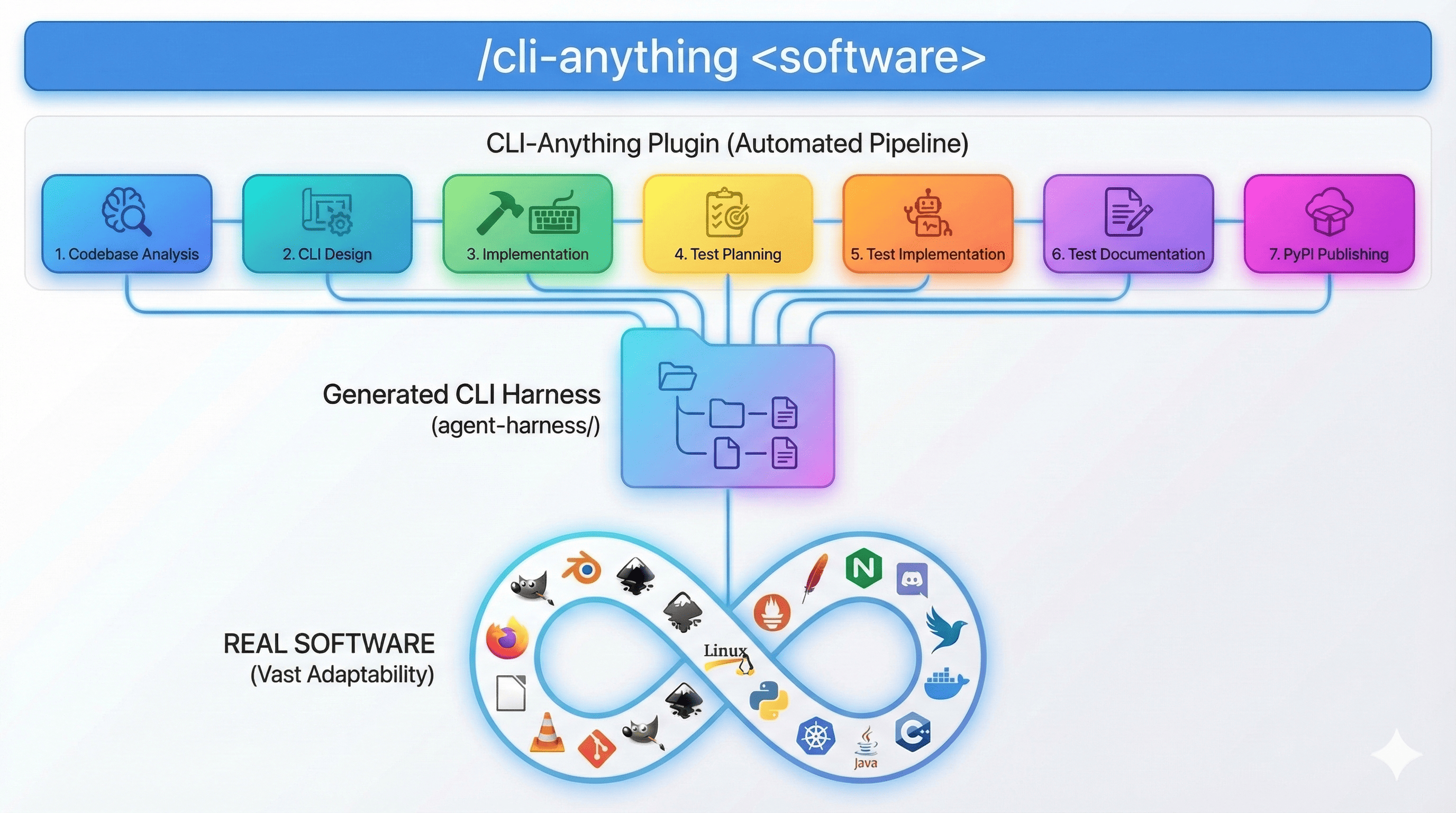
The command runs seven fully automatic stages:
-
Analyze source code and map GUI actions to APIs -
Design command groups and state model -
Build the Click CLI with REPL and JSON output -
Plan comprehensive tests -
Write unit and end-to-end tests -
Update documentation with results -
Generate setup.py and install package
After generation, install it:
cd gimp/agent-harness && pip install -e .
Now cli-anything-gimp is on your PATH and ready for Agents or humans.
If you need deeper coverage later, run refine:
/cli-anything:refine ./gimp "I need more batch processing and filter commands"
It analyzes gaps and adds new commands incrementally — no breakage.
OpenCode (Experimental but Solid)
Clone the repo and copy the command files plus HARNESS.md into your OpenCode commands folder. You instantly get five slash commands. Usage is identical to Claude Code.
Other Platforms
-
Qodercli: Run the included setup script — plugins register automatically. -
OpenClaw: Copy the SKILL.md file into your skills folder and call it with natural language. -
Codex: Run the install script (works on Windows PowerShell too), restart, and describe tasks in plain English.
Every generated CLI behaves the same way across platforms. That consistency is deliberate and saves huge amounts of time when you switch tools.
From running these steps myself, the REPL mode is surprisingly pleasant. You get persistent project state, undo/redo, a branded banner, and command history. It feels like chatting with a tool that actually remembers what you are building.
The Bigger Vision
This section answers: What future does CLI-Anything aim to create?
The goal is an Agent-native software ecosystem. Any application becomes controllable in seconds — no special APIs, no GUI scripting, no code rewrites. One command turns human-first software into something Agents can use at full power.
Where It Delivers Real Value
This section answers: Which everyday and professional scenarios benefit most?
CLI-Anything works across nine major categories. Here is the breakdown straight from the tested use cases:
| Category | How Agents Use It | Example Tools |
|---|---|---|
| GitHub Open Source | Turn any repo into a controllable tool | VSCodium, WordPress, Calibre, Zotero |
| AI/ML Platforms | Drive training, inference, hyperparameter jobs | ComfyUI, Stable Diffusion WebUI, Kohya_ss |
| Data & Analytics | Programmatic data processing and visualization | JupyterLab, Metabase, KNIME |
| Development Tools | Chain editing, build, test, deploy | Jenkins, Portainer, SonarQube |
| Creative & Media | Full content creation and rendering pipelines | Blender, GIMP, OBS Studio, Shotcut |
| Diagrams & Charts | Automated flowchart and architecture creation | Draw.io, Excalidraw, PlantUML |
| Scientific Computing | Research workflows and simulations | FreeCAD, QGIS, ParaView |
| Enterprise & Office | Business and productivity automation | LibreOffice, NextCloud, Odoo |
| Communication | Meeting, recording, and reporting automation | Zoom, Jitsi Meet |
One concrete workflow I keep coming back to: content creation. An Agent uses the GIMP CLI to batch-process images, hands them to Blender for 3D compositing, then to Shotcut for final video assembly, and finally to OBS Studio for live streaming. Every step is a clean command. The Agent stays in control the entire time.
How It Solves the Real Agent Pain Points
This section answers: What specific problems with current Agent tool integration does CLI-Anything fix?
Most Agents struggle with professional software. GUI automation breaks constantly. Available APIs are incomplete. Re-implementations lose 90 % of features.
CLI-Anything connects directly to the real backend — no compromises.
| Current Pain Point | How CLI-Anything Handles It |
|---|---|
| Agents cannot use real pro tools | Direct integration with actual backends (bpy, headless LibreOffice, GEGL) |
| GUI automation is fragile | Pure command-line control, no screenshots or clicks |
| Agents need structured data | Built-in JSON output plus readable tables |
| Custom integrations are expensive | One plugin, seven-stage automated pipeline |
| Prototype vs production gap | 1,508 tests passed on 11 real applications |
There is one honest complexity worth mentioning: real software is huge. A single generation pass gives excellent coverage, but reaching 100 % usually needs one or two refine runs. That is expected, not a flaw.
What You Can Actually Build
This section answers: Once the CLI exists, what concrete tasks can Agents perform?
Three main use cases stand out.
-
Take over entire workflows
Throw any codebase at the command and you get a full CLI. Agents can now handle GIMP batch editing, Blender rendering, LibreOffice report generation — all in one session. -
Unify scattered APIs
Feed SDK docs or API references to the builder. The result is a single stateful CLI that replaces dozens of separate HTTP calls. Token usage drops and logic becomes readable. -
Replace or supercharge GUI Agents
No more screenshot-based fragility. You can also auto-generate evaluation tasks and benchmarks directly from the CLI.
Real example with LibreOffice:
cli-anything-libreoffice document new -o report.json --type writer
cli-anything-libreoffice --project report.json writer add-heading -t "Q1 Report" --level 1
cli-anything-libreoffice --project report.json export render output.pdf -p pdf --overwrite
JSON mode for Agents:
cli-anything-libreoffice --json document info --project report.json
REPL mode feels even more natural:
cli-anything-blender
blender> scene new --name ProductShot
blender[ProductShot]> object add-mesh --type cube --location 0 0 1
blender[ProductShot]*> render execute --output render.png --engine CYCLES
How the 7-Stage Pipeline Actually Works
This section answers: What happens step-by-step when you run the generation command?
The pipeline is fully automatic:
-
Stage 1: Analyze source and map capabilities -
Stage 2: Design command groups and state model -
Stage 3: Implement Click CLI with REPL and JSON support -
Stage 4: Plan unit and end-to-end tests -
Stage 5: Write the complete test suite -
Stage 6: Update documentation with results -
Stage 7: Package and prepare for installation
Everything runs against the real software. Project files (ODF, MLT XML, SVG) are generated correctly, then handed to the actual application for rendering. That is the key difference from toy implementations.
Persistent session state, undo/redo, and a shared REPL skin keep the experience consistent across every generated tool. Installation is just pip install -e .. Agents discover tools via standard which and --help.
Testing is serious: unit tests with synthetic data, end-to-end file validation, real backend verification (PDF magic bytes, rendered PNGs), and subprocess calls to the installed CLI.
Real-World Testing Results
This section answers: How well does it actually work on complex professional software?
Eleven demanding applications were tested end-to-end. All 1,508 tests passed — 1,073 unit + 435 end-to-end.
| Software | Category | CLI Name | Backend | Tests Passed |
|---|---|---|---|---|
| GIMP | Image editing | cli-anything-gimp | Pillow + GEGL/Script-Fu | 107 |
| Blender | 3D modeling & render | cli-anything-blender | bpy | 208 |
| Inkscape | Vector graphics | cli-anything-inkscape | SVG/XML manipulation | 202 |
| Audacity | Audio production | cli-anything-audacity | wave + sox | 161 |
| LibreOffice | Office suite | cli-anything-libreoffice | ODF + headless | 158 |
| OBS Studio | Streaming & recording | cli-anything-obs-studio | JSON + obs-websocket | 153 |
| Kdenlive | Video editing | cli-anything-kdenlive | MLT XML + melt | 155 |
| Shotcut | Video editing | cli-anything-shotcut | MLT XML + melt | 154 |
| Zoom | Video conferencing | cli-anything-zoom | REST API (OAuth2) | 22 |
| Draw.io | Diagram creation | cli-anything-drawio | mxGraph XML | 138 |
| AnyGen | AI content generation | cli-anything-anygen | REST API | 50 |
Total: 1,508 tests passed at 100 %.
The test layers are strict: synthetic unit tests, file-structure validation, real-application output checks, and live CLI subprocess verification.
Core Commands and Daily Usage
This section answers: How do you use the generated CLIs once they exist?
Main commands:
-
/cli-anything <path>— build full CLI -
/cli-anything-refine— expand coverage -
/cli-anything-test— run and document tests -
/cli-anything-validate— check against standards -
/cli-anything-list— show installed tools
Installation is always the same: cd agent-harness && pip install -e .
The HARNESS.md document inside the repo contains the distilled best practices that made all 11 CLIs production-ready. Key lessons include: always use the real renderer, watch for filter translation differences, handle non-integer frame rates carefully, and never trust exit code 0 alone — always validate output bytes and content.
Known Limitations (Honest View)
This section answers: Where does CLI-Anything still need care?
It performs best with strong frontier models. Weaker models may require extra refine cycles. It needs accessible source code — binary-only applications need decompilation first. Full coverage often arrives after one or two refinement passes rather than the first run.
That complexity is real, but the iterative refine mechanism turns it into a manageable, incremental process.
Practical Checklist You Can Use Today
-
Clone the repo or add the plugin marketplace. -
Install for your chosen platform. -
Run the generation command against your target software. -
Install the resulting package with pip install -e .. -
Explore with --helpor enter REPL mode. -
Extend coverage with refine when needed. -
Run tests locally with pytest. -
Use --jsonmode for Agent consumption.
One-Page Summary
-
One command generates a full CLI for any codebase -
Works with Claude Code, OpenClaw, OpenCode, Codex, Qodercli -
Seven-stage automatic pipeline (analysis → packaging) -
Real backends only — no toy implementations -
JSON + REPL + 1,508 verified tests -
Covers creative, office, streaming, data, and dev tools -
Ready for immediate Agent integration
From building and testing several of these CLIs myself, the biggest lesson is simple: Agents do not need every piece of software rewritten. They just need a clean, structured command interface. Once that exists, the rest of the workflow becomes dramatically more reliable.
Next step: pick one tool you use daily — GIMP, Blender, LibreOffice, whatever — clone the repo, and run the generation command. You will see in minutes how much control an Agent suddenly gains. Try it on your own project and let me know what you build first.
FAQ
How long does it take to generate a CLI?
Most applications finish the full seven-stage pipeline in minutes on modern hardware.
Do I need the original software installed?
Yes. Tests and rendering call the real application. There are no fallback modes.
Can I extend an existing CLI later?
Absolutely. The refine command analyzes gaps and adds new commands without breaking anything.
Does it work on Windows?
Yes, but Claude Code needs Git for Windows for bash support. All generated CLIs install and run normally.
Is the output safe for production Agent use?
The 1,508 tests across 11 applications were designed to prove exactly that. JSON mode is stable and predictable.
Can I use it with my private internal tools?
Yes. Any codebase you can point to works. No internet or public repo required.
What if the first generation misses some features?
Run refine once or twice with a focus description. Coverage improves incrementally.
Is there ongoing maintenance?
The generated CLI stays in sync with your software because it is built from the actual source. Re-run the pipeline when the upstream project updates significantly.
The project is MIT licensed and open for contributions. Whether you want to add support for new platforms or bring in your own specialized software, the path is clearly documented.
Start with one tool today. The bridge between Agents and real software is no longer theoretical — it is one command away.
